
UGC Conversion Rates: Real Data and a Shopify Test Plan
By Foxr Team · Foxr · Updated · 26 min read
A good UGC (user-generated content) conversion rate is one that beats your own page without UGC. The big UGC conversion rates you see online can't tell you that.
One vendor's figure has swung from 3.73× to 19.88× in six quarters. In PowerReviews' data from 1.5 million product pages, shoppers who just saw UGC converted 3.8% more often than average. Shoppers who clicked on it converted about twice as often, but they were likely more eager to begin with.
This guide traces those numbers to their sources. Then it gives you a 7-step plan to collect customer videos, get permission, add them to your Shopify store, and test the lift yourself.
Made-up example: a backpack page says "fits a 15-inch laptop." A buyer's 20-second clip shows it also fits a lunch box and a rain jacket, and she says the strap feels stiff on day one. That one honest clip answers a doubt the photos can't.
Full disclosure: We make Foxr Shoppable Videos & UGC, which shows up in Steps 2 to 7. It launched on September 25, 2026, so we have no UGC test results of our own. Every step works with any tool.
Key takeaways
- Big UGC numbers can't predict your store. One vendor's UGC number fell from 10.38× to 4.27× in a single quarter, then rose to 6.73× and 19.88× over the next two.
- Seeing UGC and clicking on it are different. In PowerReviews' data, seeing it came with a 3.8% lift. Clicking came with a 102.4% lift, from shoppers who were likely already keen.
- Start with the doubt. Pick the one question that stops sales on your top product, and get a customer clip that answers it.
- Get a written yes, and reward honesty. Say who made each clip. Never fake a customer.
- Put 3 tagged clips near the buy button, and label them. Foxr Shoppable Videos & UGC is one free option. Its Product page layout shows each product's own clips.
- Judge by add-to-cart rate and revenue per visitor, from a fair test. A small store can only spot big changes.
UGC conversion rates: where the big numbers come from
Search "UGC conversion rates" and you'll see big numbers. On October 11, 2026, we traced the popular ones to their sources:
| The number | What it compares | The catch |
|---|---|---|
| 3.73× to 19.88× (Emplifi) | UGC vs. no UGC: posts, then pages, then brands | Six quarters, six answers |
| 161% (Yotpo) | Shoppers who looked at UGC vs. those who didn't | Eager shoppers, vendor data |
| 144% (Bazaarvoice, 2022) | Not stated | The vendor's own total |
| 102.4% (PowerReviews, 2022 data) | Clicked on UGC vs. the average visitor | Just seeing UGC: +3.8% |
| 1.37× (Eevy AI, 2026) | Pressed play vs. saw the video and didn't | Only 3 stores |
Here are the details behind the table:
- Emplifi's six quarters: 3.73× and 5.29× (Q1 and Q2 2025), 10.38× (Q3 2025), 4.27× and 6.73× (Q4 2025 and Q1 2026), then 19.88× (Q2 2026, on its auto industry benchmark page).
- Emplifi keeps changing the test. First it compared UGC posts with other posts. Then pages with and without UGC. Then brands that use UGC with brands that don't. It covers its own customers ("tens of thousands" of brands in one line, "thousands of U.S. brand accounts" in its methodology), with no exact count and no definition of "conversion."
- Even Emplifi's labels move. Its August 2025 release calls Q2's 4.3× a lift in order value. Its October 2025 release calls the same 4.3× a lift in website visits.
- PowerReviews studied 1.5 million product pages on more than 1,200 sites in 2022. Visitors shown UGC converted at 3.3%, against 3.2% for all visitors. PowerReviews calls that a 3.8% lift (its rates are rounded). Visitors who clicked on it converted at 6.4%, a 102.4% lift (103.9% for customer photos and videos).
- Why that gap matters: same pages, same year. The clickers were likely more engaged already, so the 102.4% can't all be credited to the UGC. The study covers reviews, Q&A and images, and PowerReviews sells review software.
- Yotpo's 161% comes from a Data Labs video (200,000 stores, 163 million orders). It compares people who "look at UGC" with people who don't. That's the same eager-shopper comparison.
- Eevy AI has 45 Shopify stores in its network. Only 3 had enough video traffic for the 1.37× (75,156 viewers). The authors call it "correlational, not causal." In plain words: it shows a link, not proof that the video caused the sales.
Some popular numbers, like "29% higher web conversions," we couldn't trace to any study, so we left them out.
What the numbers mean for your store
- Viewers were likely interested already. Someone who taps play wants to know more. They may buy more often even without the video.
- Settings differ. A social post, a product page and a review widget are three different tests.
- Every source above sells software. That's normal. Read a seller's number as a best case for your store.
- A split test shows a much smaller lift. Idukki, a UGC vendor, reports one 50/50 test with 30,000+ visitors per side and a +20% lift on pages with its shoppable UGC. It doesn't publish the full method. We didn't find a test of UGC video alone on Shopify that does.
Expect the most help where doubt is highest: pricey items, new brands, and products where fit or results are hard to judge from photos. How much help? Only your own test can say. Step 7 shows how.
Why customer videos help people buy
Here is what research says about trust:
- People trust people. Nielsen's 2021 study of 40,000+ consumers found 88% trust recommendations from people they know. A customer isn't a friend. But a real buyer feels closer to one than an ad does.
- Shoppers say customer photos and videos tip the choice. In a PowerReviews survey of 15,870 US shoppers, 91% said they're more likely to buy when reviews include photos and videos. 23% said they won't buy if no customer has shared any. These are survey answers, from a review software company.
- Reviews show what trust is worth. Northwestern's Spiegel Research Center found a product with five reviews was 270% more likely to be bought than one with none. The effect was bigger for pricey items (380%) than cheap ones (190%). That study is about reviews.
- A little imperfection helps. In the same research, purchase odds peaked at 4.0 to 4.7 stars and dipped near a perfect 5.0. That's about star ratings, not videos, but it suggests a clip that mentions a small flaw can feel more believable.
What UGC video costs
UGC video is any video made by someone outside your brand team: an unboxing, a try-on, a how-to, or a quick review.
| Type | Who makes it, and the cost | Best use |
|---|---|---|
| Customer UGC | A real buyer. Free, or a small thank-you. | Trust on product pages |
| Creator UGC | A paid creator who acts like a customer. Paid per video. | Ads, or when you have no customer clips yet |
| Brand video (not UGC) | Your team or a studio. Costs time or budget. | Features and brand story |
A ppc.io review of six UGC marketplaces (updated January 2026) found an average near $212 per video, with a typical range of $150 to $300. Some larger creators charge 30% to 50% more for wider usage rights, like ads. Whatever you use, label it (Step 6).
Step 1: Pick the doubt a customer clip can answer
Start with your best-selling product page and the 3 questions that stop people from buying. Our guide to increasing Shopify conversion rate with video shows where to find them, from pre-sale chats to return reasons.
Then match each doubt to a customer clip, and to the exact thing you'll ask the customer to film:
| The doubt | The clip to look for | What to ask the customer |
|---|---|---|
| "Will it fit me?" | A try-on with height and size on screen | "Tell us your height and size, then show us." |
| "How big is it, really?" | The product next to something familiar | "Show it next to your phone or a mug." |
| "Is it worth the price?" | A real unboxing | "Show what came in the box." |
| "Is it hard to use?" | A first-time setup | "Film your first try." |
| "Is the quality good?" | A close-up in hand | "Show us the stitching, the feel, the weight." |
| "Does it work? Will it last?" | A check-in after a week, or after a few months | "Tell us what you noticed." |
Step 2: Collect customer videos
You need a small, friendly ask. Here are six ways to get clips:
- Ask in your post-purchase email or text. Wait until they've used the product long enough to have an opinion. Our rule of thumb: about a week for clothes and small gear, about a month for skincare.
- Ask for video in your review request. If your review app accepts video reviews, say so in the email.
- Reply to tagged posts. When a customer tags you on Instagram or TikTok, send a friendly DM. Once they say yes, paste the post link on the "Instagram" or "TikTok" tab in Foxr Shoppable Videos & UGC. It saves a copy to your Shopify Files, so the clip keeps playing even if they delete the post. Want a feed that updates itself instead? See our shoppable Instagram feed guide.
- Tuck a card in the box. Something like "Film your unboxing and get 10% off," with a link or QR code to an upload form.
- Mine your support inbox. Someone who wrote "love it!" is easy to ask: "Could you film 15 seconds?"
- Send free product to a few small creators. Call it what it is: a partnership.
Make the ask easy:
- Give a 3-line brief: what to show, 15 to 30 seconds, filmed upright. Need format ideas? See these shoppable video ideas.
- Don't script it. A script makes a customer sound like an ad.
- Keep a simple sheet: name, @handle, post link, product, and the date they said yes. Foxr Shoppable Videos & UGC doesn't store the handle or link with the clip, so this sheet is your only record.
The safe way to say thanks: you can reward people with a coupon or free product. The FTC's rule Q&A says incentives are allowed, as long as you don't require a positive (or negative) review. Ask for an honest video, not a happy one.
- Don't say: "Tell us how much you loved it and get 10% off."
- Say: "Share your honest experience and get 10% off."
Step 3: Get permission and follow the rules
These rules protect your brand and the customer:
- Get a written yes. A DM or email is fine. Say where you'll use the clip (site, email, ads) and for how long.
- Know who owns it. Copyright starts the moment a person makes something, says the U.S. Copyright Office. So the shopper who filmed it usually owns it. A tag or hashtag isn't the same as a yes.
- Check the music. A hit song in a customer's clip may not be cleared for your use. Ask for a version without music, or mute it and add subtitles.
- Never fake it. The FTC's fake reviews rule took effect on October 21, 2024. It bans fake reviews and testimonials, including AI-made ones from people who don't exist, and rewards that depend on a positive (or negative) review. It covers your website and social media.
- Keep AI actors out of your proof. The FTC's rule Q&A says AI avatars aren't banned outright. Fake or false testimonials are, like a made-up "customer" who never used your product. Keep AI actors to clearly labeled brand ads.
- Disclose deals. If someone got free product, a discount, or money, say so. The FTC's disclosure guide says to put it in the video itself, where people can't miss it.
- Follow Google's review rule. Google's review snippet guidelines say not to include fake reviews, or reviews someone was rewarded for without saying so, on your page or in your structured data. Breaking them can get your pages a penalty from Google (a "manual action").
- Protect privacy. Blur addresses on boxes. Get a parent's OK for anyone under 18.
Here is a message you can copy:
Hi Sam! Your video is great. Can we feature it on our website and product pages for the next 12 months? We'll credit you. Just reply "yes" to give us permission.
Still waiting on a yes? New clips in Foxr Shoppable Videos & UGC start as "Active." Set "Status" to "Draft" on the clip's page, or tick the clips in "Video library" and click "Set draft." Draft clips stay in your library but are hidden from every widget.
Watch out: drafts don't count toward a widget's minimum, so drafting too many can hide the whole widget.
This is general info, not legal advice. Rules differ by country.
Step 4: Pick the clips that sell
Score each clip with five questions. Give one point for each "yes." Keep the clips that score 4 or 5.
- Is the product on screen in the first 3 seconds? In Eevy AI's data (6,190 watch sessions), fewer than 1 in 5 reached the 75% mark. So put the answer up front.
- Does it answer one of your top 3 doubts?
- Can you follow it with the sound off? The web accessibility standard, WCAG, lists captions on recorded video as a basic Level A need. They help shoppers who are deaf or hard of hearing, and anyone with the sound off.
- Does it feel real? A shaky phone clip is fine. A clip that sounds like a sales pitch reads as an ad.
- Is it safe to show? You have permission. There are no miracle claims. There's no private info.
Three more rules:
- Keep the small flaws. "The strap is stiff at first" builds trust.
- Skip big claims. "Cleared my skin in 3 days" is a problem for you. The FTC's health claims guidance says these need scientific proof, even when a customer says them.
- Add subtitles you've checked. Read auto-captions by hand, especially product and brand names. In Foxr Shoppable Videos & UGC, open the clip in "Video library." Under "Details," click "Upload subtitle file" (.vtt or .srt, up to 512 KB), or paste the text into "Subtitles (WebVTT)." Then click "Save." Shoppers get a "CC" button in the player. New subtitles can take up to about 10 minutes to appear, and the app doesn't write subtitles for you. (Subtitles docs)
Step 5: Add the clips to your Shopify store
Shopify describes a shoppable video as a video with product links that lets viewers add items to their cart. See how one works on a live store. You have two routes.
Route 1: Shopify product media
Good for a first test on one product. In the product's media, upload an .mp4, .mov, or .webm file (up to 1 GB and 10 minutes), or paste a YouTube or Vimeo link. See Shopify's product media types.
The catch: themes usually show it as plain video, with no product tag or add to cart inside the player.
Route 2: A UGC video app
Most UGC video apps work the same way: add clips, tag a product, build a widget, add an app block. One free option is Foxr Shoppable Videos & UGC. We make it, so we're biased. Here are the facts:
| At a glance | Foxr Shoppable Videos & UGC |
|---|---|
| Price | Free |
| Rating | 5.0 stars from 7 reviews (checked on October 11, 2026) |
| Made by | FOXR APP (United Kingdom) |
| Launched | September 25, 2026 |
| Language | English |
| Install | Shopify App Store |
For customer clips in Foxr Shoppable Videos & UGC, two steps matter most:
- Import a customer's post. Go to "Video library" → "Add media" → the "Instagram" or "TikTok" tab. Tick "I confirm that I have obtained the necessary permissions, copyrights, and authorizations." Paste up to 5 links and click "Find media." Then click the "Add to library" button under the cards.
- Build a Product page widget. Go to "Widgets" → "Add widget." Type a "Widget name" and set "Layout" to "Product page" (Placement switches to "Product pages"). Click "Choose clips" (up to 24), pick the clips, click "Done," then click "Save."
Then tag the product on each clip, turn on the "FOXR - Shoppable Video" app embed, and add the "UGC widget" block (exact clicks).
Tapping the product card in the player opens a quick add panel with one variant dropdown, "Quantity" and "Add to cart." By default, the shopper then goes to the cart page. To keep the video playing, pick "Quick add" under "Add to cart action" in Settings → Products.
Either way, your theme's cart drawer won't open and the cart count in the header won't change until the next page. That's expected.
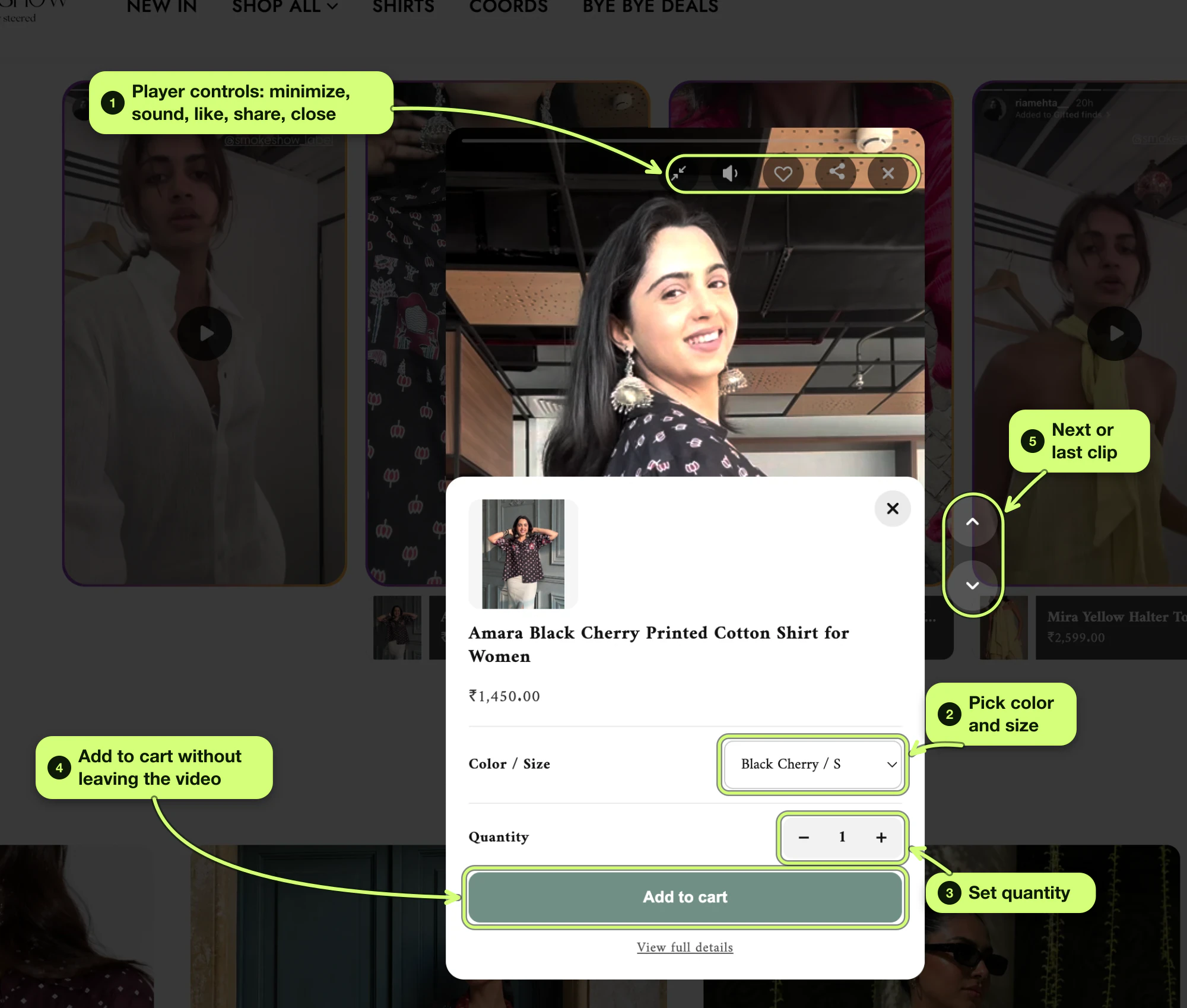
What to know before you install, from its docs:
- It's new. It launched on September 25, 2026, and had 7 reviews when we checked.
- One product per clip. If a clip shows several products, tag the main one.
- Imports are public posts only. It imports public Instagram reels and video posts and public TikTok videos, 5 links at a time and up to 250 MB each. Private accounts, stories and image-only posts don't work. The checkbox is only a reminder: you still need the creator's yes. The app doesn't keep the creator's username or the post link, so log credit in your sheet (Step 2).
- Products without a tagged clip show every clip. On the Product page layout, "Show every clip when none match" is On by default. That can put other products' customer videos on a page. Turn it off on the "Product page" tab if each page should show only its own customers.
- Sales credit isn't proof. A clip gets credit if a shopper buys within 30 days from the same cart. Test orders and your own visits count, and refunds aren't subtracted. More limits are in Step 7.
- Search and AI reach. In Settings → AEO & GEO, "Add video structured data" and "Include the transcript in structured data" are both On by default. The transcript comes from a clip's subtitles, so clips without subtitles get none. Google says its AI features don't need special markup. It also says a product page isn't a "watch page," so don't expect video results there (why).
For every click and setting, see how to add shoppable videos to Shopify. Comparing tools? See our roundup of the best UGC apps for Shopify.
Step 6: Put customer clips where shoppers decide, and label them
Where a clip sits can matter as much as what's in it. In Eevy AI's randomized tests on 7 Shopify stores, showing the same reviews and videos in a different layout changed conversion by a median of 13.4% from worst layout to best.
Label every clip
Use "Verified buyer" (only if you checked), "via Instagram," or "Creator partner." If someone got a coupon or free product, say so.
In Foxr Shoppable Videos & UGC, the caption shoppers see comes from the file's alt text in Shopify Files (Content → Files). The clip's "Caption" field only feeds search engine data.
So write the label in the alt text, for example "Verified buyer · got a free sample." Then turn on "Show captions" on the widget's "Player" tab and save the widget.
Captions show under Carousel and Grid cards, over Product page clips, and in the player. Stories and Pop up thumbnails never show them. A caption doesn't replace the FTC disclosure inside the video itself. (Player docs)
Match each spot to a layout
| Where | What to show | In Foxr Shoppable Videos & UGC |
|---|---|---|
| Product gallery, spot 2 | Your best "answers the doubt" clip | Use Shopify product media |
| Under the buy buttons | 3 clips of that product | "Product page" layout |
| Collection pages | One clip per best seller | "Stories" layout, Placement "Collection pages" |
| Home page | An "As seen on TikTok" row | "Carousel" layout |
In most themes, an app block can't go inside the product photo gallery. So the gallery spot means a plain video in Shopify product media. The app's strip goes wherever you drop the "UGC widget" block.
In a Product page widget, the key settings are on the "Product page" tab. "Which clips" defaults to "Only clips tagged with this product," and "Clips on screen" defaults to 3. New Product page widgets save with captions off, so turn on "Show captions" on the Player tab if you use labels. (Product page layout docs)
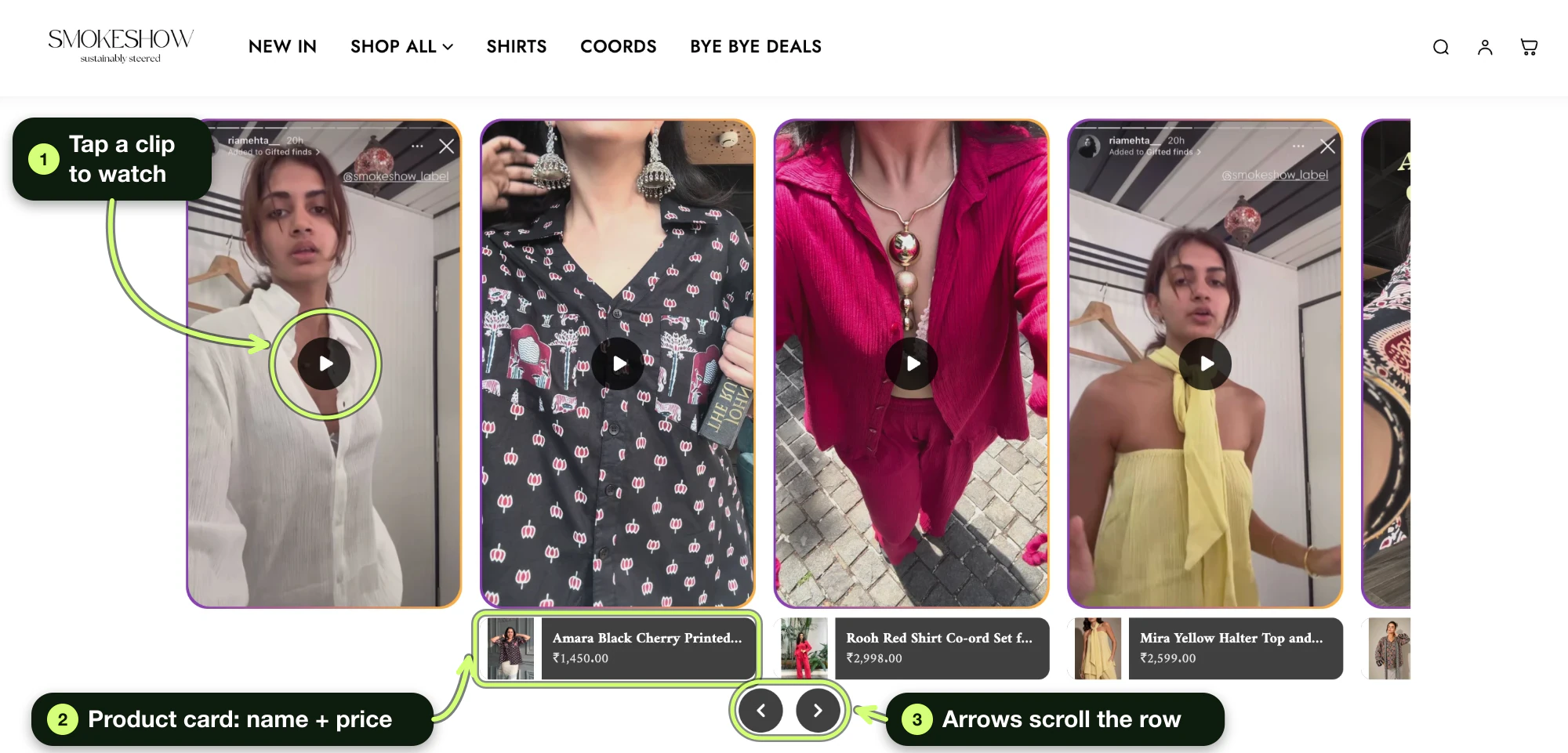
Spell by Smokeshow, an Indian clothing brand on Shopify, uses a Foxr Shoppable Videos & UGC carousel on its home page (live when we checked on October 11, 2026).
Keep the page fast
A Largest Contentful Paint (LCP) of 2.5 seconds or less is good. In Foxr Shoppable Videos & UGC, "Preview videos" is off by default on Stories, Carousel and Grid, so clips play only when tapped. For the full speed check, see Step 6 of our video conversion guide.
Step 7: Measure your UGC conversion rate the right way
Plays tell you who watched. To see what sold, track three numbers for visits to that product page:
- Add-to-cart rate: visitors who add to cart ÷ visitors.
- Conversion rate: orders ÷ visitors.
- Revenue per visitor: revenue ÷ visitors. It catches both more orders and bigger orders.
Shopify's Conversion rate over time report covers your whole store. It shows "Sessions," "Sessions with cart additions" and "Conversion rate." Your store's add-to-cart rate is Sessions with cart additions ÷ Sessions.
For one product page, the Sessions by landing page report shows sessions that start on that page. It misses shoppers who arrive from another page, so treat it as a rough count, and compare the same report before and after.
Don't compare people who watched with people who didn't. They were different from the start, as the PowerReviews numbers show. Use one of these instead:
- A/B test (best). Half of visitors see the clips. Half don't. Both run at the same time. Shopify's own tool for this is a Rollouts Experiment (Markets → Rollouts). It tests theme changes, so you can test a theme with the "UGC widget" block against one without it. It needs the Grow plan or higher and doesn't work on vintage themes.
- Week on, week off. Show the clips for a week, hide them for a week, and repeat. In Foxr Shoppable Videos & UGC, tick the clips in "Video library" and click "Set draft," then "Set active" the next week. That hides them in every widget that uses them within a minute or two. If your Product page widget also holds other products' clips, first turn off "Show every clip when none match" on its "Product page" tab and click "Save." Otherwise the page shows those other clips during the off week.
- Before and after (weakest). Compare 2 to 4 weeks before with 2 to 4 weeks after. Use the same weekdays. Don't change prices or run a big sale. Start the "before" window after September 23, 2026, when Shopify changed how it counts sessions (details).
Small lifts need a lot of traffic to spot. We ran the math for you:
| Lift you want to spot | Conversion rate (from 2%) | Add-to-cart rate (from 8%) |
|---|---|---|
| +10% | 81,000 | 19,000 |
| +20% | 21,000 | 4,900 |
| +30% | 9,800 | 2,300 |
Visitors needed for each version. "+20%" means 2.0% becomes 2.4%. The math assumes you want to be 95% sure the change is real, with an 80% chance of catching it if it is.
Made-up example: your page gets 3,000 visits a month. A 10% lift in conversion rate would take years to show. Even a 30% jump in add-to-cart rate needs about 4,600 visits (2,300 per version), so plan on 6 to 7 weeks, not 4. Until then, treat the result as a hint.
Check your own numbers with Evan Miller's free sample size calculator.
Reading the numbers in Foxr Shoppable Videos & UGC
Go to "Widgets" and click the chart button ("View analytics") on a widget's row. The "Clips" section lists Revenue, Views, Plays, Product clicks, Added to cart and Orders for each clip, highest revenue first.
The page defaults to "Last 30 days." Pick "Last 90 days" on a quiet store.
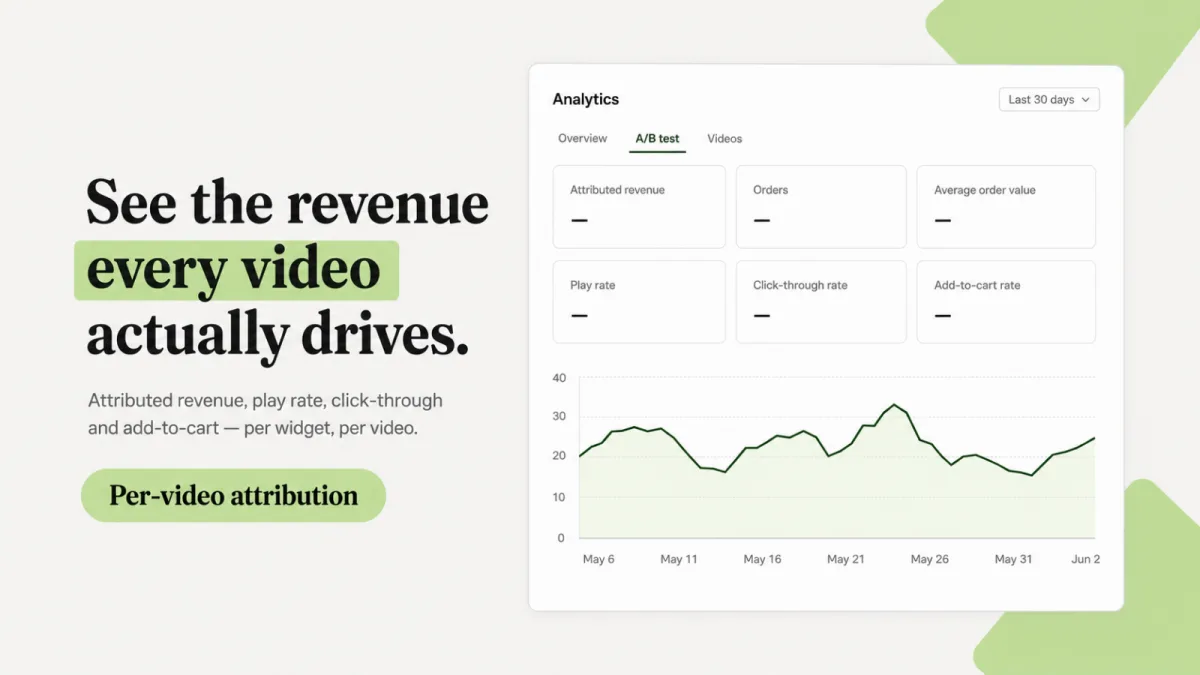
App Store image. The live analytics page shows 12 cards and a "Clips" list.
The app's rates use different math from the page rates above. Its "Conversion rate" is orders ÷ widget views. Its "Add-to-cart rate" is added to cart ÷ product clicks. (Analytics docs)
| What you see | What it likely means | What to do |
|---|---|---|
| Low "Play rate" | Shoppers don't notice the clips | Move the block up; lead with your best clip |
| Low "Click-through rate" | Clips don't lead to a product | Tag a product on every clip |
| Low "Add-to-cart rate" | Shoppers look at the product, then pass | Check price, photos and stock |
| More add-to-carts, same orders | Something later blocks the sale | Check shipping cost and checkout |
What counts as a low play rate? The app counts a view on every page load, so a few percent is normal for a widget low on the page.
Eevy AI's median play rate across 3 stores was 5.4%. Eevy measures it differently (shoppers who pressed play out of shoppers who saw the videos), so use it only as a rough guide.
The app's sales credit also has gaps:
- Where shoppers are asked about cookies, those who decline analytics aren't credited.
- Express checkouts from the product page and purchases on another device aren't credited.
- There's no staff filter and no export, and the numbers don't appear in Shopify's own Analytics.
To find which customer clips sell, use the widget's A/B test. It compares two versions of a widget, such as two sets of clips, so it can't test video against no video. Steps are in our setup guide.
It names a winner on orders per view only, after at least 500 views per version, at 95% confidence.
On a small store, expect "Still collecting." or "No clear winner yet." for a while. Run it for at least a full week. (A/B testing docs)
UGC video not converting?
If sales didn't move, check these first:
- It answers the wrong doubt. Go back to Step 1 and pick a different question.
- It looks like an ad. Swap polished clips for real ones from buyers.
- It has no label. Shoppers can't tell a real buyer from an actor. Add "Verified buyer" or "via Instagram" (Step 6).
- The problem isn't the video. UGC can't fix a high price, slow shipping, or the wrong traffic. If ad clicks aren't buying, check that your ad matches your page.
Your 8-week plan
- Week 1: Pick your top product. List its 3 doubts. Write your ask and send it to buyers from the last 60 days.
- Week 2: Collect clips. Get written permission. Add subtitles. Score each clip and keep the best 3.
- Week 3: Add the 3 clips to "Video library" in Foxr Shoppable Videos & UGC. Open each clip, set "Link type" to "Product" under "Call to action," click "Add product," pick the product, and click "Save." Build a "Product page" widget, switch on the "FOXR - Shoppable Video" app embed, and add the "UGC widget" block under the buy buttons. On Home, check that step 3 of the Setup guide says "Live." Then open the page on your phone in a private window. Write down your add-to-cart rate, conversion rate, and revenue per visitor from the full weeks since September 23, 2026 (up to 4).
- Weeks 4 to 7: Run your test for at least 4 weeks. On a small store, keep going until each version has the visits in the table above. Don't change prices or run a big sale.
- Week 8 or later: Read the results. Keep what works. Film the next doubt, then repeat on your next product.
How we made this guide
- The numbers. On October 11, 2026, we traced each UGC number to the vendor's own page: four Emplifi releases and reports, PowerReviews, Yotpo, Bazaarvoice, Eevy AI and Idukki. We noted what each one compares, because most stat lists skip that.
- The search results. We read the top Google results for "UGC conversion rates," which are mostly stat lists and creator price guides. None gave a merchant a test plan with traffic numbers, so we built one.
- The math. We ran the sample sizes with a standard two-group test (95% confidence, 80% power).
- What we didn't do. We didn't run a store test of our own, and we didn't test other apps hands-on.
- The rules come from the FTC, the U.S. Copyright Office, and Google Search Central.
- Facts about Foxr Shoppable Videos & UGC come from its docs and App Store listing, checked on October 11, 2026. We make it, and we named its limits.
FAQ
What is a UGC conversion rate?
A UGC conversion rate is the share of shoppers who buy after seeing user-generated content. On a store, it means visitors who buy. In ads, it means clicks that lead to a sale.
The fairest way to measure it on your store is to compare a product page with UGC video against the same page without it.
What is a good UGC conversion rate?
One that beats the same page without UGC, in a fair test. Published figures run from a 3.8% lift for shoppers who saw UGC to 19.88× in one vendor's report, so they can't set a goal for your store.
Does UGC video increase conversion rate on Shopify?
It can, mostly where shoppers feel unsure, like pricey items or products where fit is hard to judge. Research on reviews shows trust pays off, and shoppers say photos and videos from real customers make them more likely to buy.
But strong proof for UGC video alone on Shopify is thin, so test it on your own store.
Do I need permission to use a customer's video?
Yes. The person who films a video usually owns its copyright, so you need their permission to use it.
Get a written yes that says where and for how long you'll use it. A tag or hashtag isn't permission. This is general info, not legal advice.
Can I give a discount for a customer video?
Yes, as long as the reward doesn't depend on praise. The FTC's fake reviews rule bars rewards that require a positive (or negative) opinion, whether you say it out loud or only hint at it. If someone got a coupon or free product, disclose it in the video.
Can I use AI-made UGC videos?
You can use AI actors in clearly labeled brand ads. Don't present an AI-made "customer" as a real review or testimonial on your store.
The FTC's rule has no blanket ban on AI avatars, but it prohibits testimonials that are fake or false, and misleading use can also break the FTC Act.
Will UGC video slow down my Shopify store?
It can if files are heavy or load right away. See Step 6 of our video conversion guide.
Which app should I use for UGC video on Shopify?
Pick by what you need: product tags, add to cart in the player, subtitles, speed, numbers for each clip, and price. Foxr Shoppable Videos & UGC is free and covers those, though it's new and its listing is English only. Compare others in our roundup of the best UGC apps for Shopify.
Next step: test one product
You don't need 50 videos. You need one product, three honest clips, and one number to watch.
When you're ready to make the clips shoppable, try Foxr Shoppable Videos & UGC. It's free on the Shopify App Store.
Disclosure: We make Foxr Shoppable Videos & UGC, so we're not neutral. Every step in this guide works with any tool, or with none.