
Shoppable Instagram Feed on Shopify: How to Add One (2026)
By Foxr Team · Foxr · Updated · 21 min read
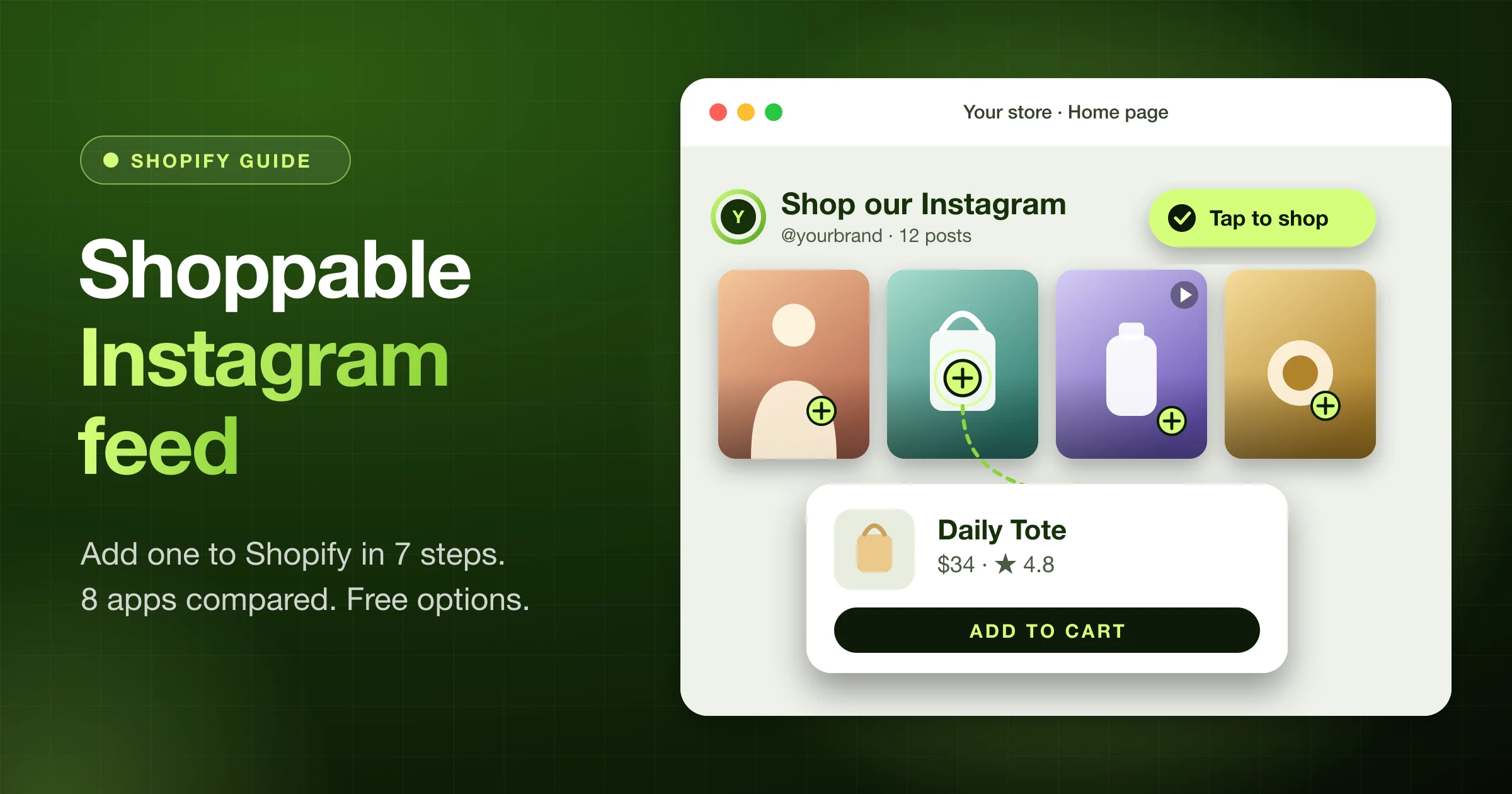
A shoppable Instagram feed is a row or grid of your Instagram posts on your Shopify store. Shoppers tap a post, see the products in it, and add them to the cart.
To add one, install a feed app and connect your Instagram Business or Creator account. Then tag products on your best 8 to 12 posts and add the app's block in the theme editor.
Below you'll find the 7 steps and 8 feed apps compared by the cheapest plan with product tags (checked on October 11, 2026). You'll also see what we found on 5 live stores, how much code each feed adds, free options, and 8 fixes.
Full disclosure: We make Foxr Shoppable Videos & UGC, a shoppable video app. It is not an Instagram feed app, and we say where it fits and where it doesn't. Prices and ratings below come from the Shopify App Store on October 11, 2026.
Key takeaways
- You need an app. Shopify's free Dawn and Horizon themes have no Instagram feed section.
- Product tags are often the paid part. Square and MP Instagram Feed tag products for free. Instafeed starts at $8 a month, and Foursixty at $90.
- Most apps need an Instagram Business or Creator account.
- Pick 8 to 12 posts where the product is easy to see (the number Vitals' help page suggests). Leave out memes and event photos.
- Check the weight. The two feed apps we measured added about 43 to 45 KB of code, before any photos.
- Ask before you show a customer's post.
What is a shoppable Instagram feed?
It's a gallery of Instagram posts on your website, where each post is linked to products. A shopper taps a post, sees the tagged items with prices, and adds one to the cart or goes to its product page.
It is easy to mix up with two other things:
| Term | Where it lives | What shoppers can do |
|---|---|---|
| Plain Instagram feed | Your store | Look, then go to Instagram |
| Shoppable Instagram feed | Your store | Tap a post and buy |
| Instagram shopping tags | Tap a tag, then buy on your store |
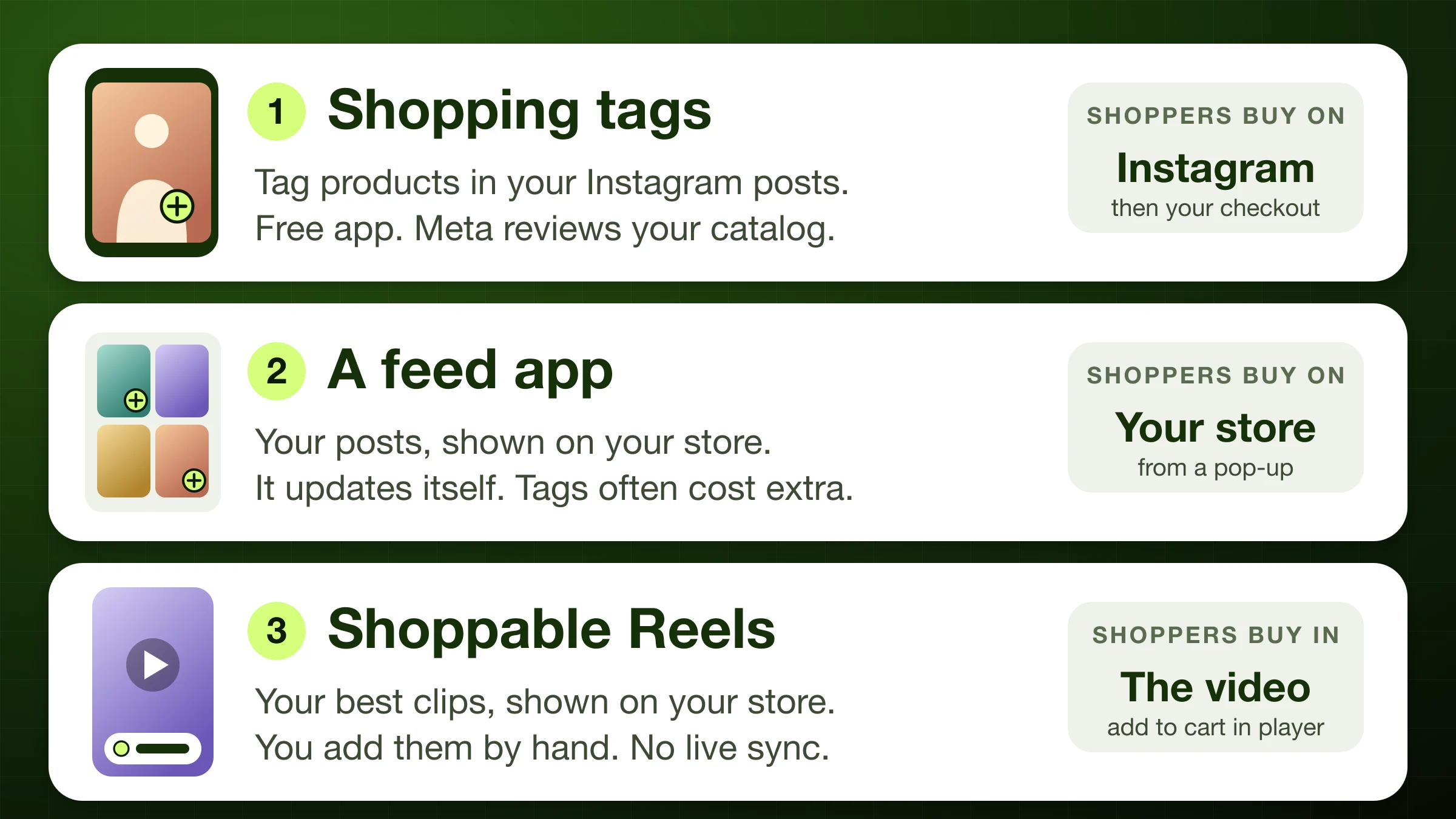
This guide is mostly about the middle row: a feed on your own store. We cover tags on Instagram and shoppable Reels further down.
Is a shoppable Instagram feed worth it?
It helps when shoppers want proof that real people use your product. A post of a customer wearing it can answer "How does it look in real life?" better than a studio photo.
It won't help much if:
- Your posts don't show products. Quotes, memes, and event photos can't be tagged.
- You post rarely. A feed with old posts looks stale.
- The page gets little traffic. You won't be able to tell if it works.
- It slows the page down. A slow page can cost more sales than the feed brings in.
We found no independent study of shoppable Instagram feeds. Vendor pages show big lifts, but we couldn't trace them to a study. So treat it as a test you measure.
Before you start: 4 checks
- Your account type. Most feed apps need an Instagram Business or Creator account. Meta shut off its old Instagram Basic Display API on December 4, 2024. Its post points apps to newer APIs built for business and creator accounts. One exception: Socialwidget's listing says its free plan works with personal accounts too.
- Posts that show products. Scroll your last 40 posts. Count the ones where the product is easy to see.
- Permission. Your own posts are fine. A customer's post needs a written yes.
- Your numbers. Write down the add-to-cart rate on the page where the feed will go. You'll compare it later.
How to add a shoppable Instagram feed to Shopify: 7 steps
These steps work for most feed apps. Names of buttons differ a little from app to app.
- Pick an app. Use the comparison below. Check which plan includes product tags.
- Install it from the Shopify App Store.
- Connect Instagram. Log in through Instagram or Facebook. Use your Business or Creator account.
- Choose your posts. Many apps show every new post by default. Turn that off if you can, and pick 8 to 12 posts by hand.
- Tag products. Open each post and link the products in it. Some apps let shoppers add to cart from the post. Others only link to the product page.
- Add it to your theme. In Shopify, go to Online Store → Themes and click Customize next to your theme (Shopify's Help Center calls it Edit theme). Open the page you want, click Add section (or Add block), find the app under Apps, and click Save.
- Test it on your phone. Tap a post, add a product, and check that it lands in the cart. Then run a speed test.
On an older (vintage) theme? Shopify says app blocks only work with compatible themes, but app embeds work with any theme version. Check the app's docs for an app embed or a code snippet.
Changing themes later? Shopify says apps "won't be active by default" in a new theme. Turn the app back on and re-add the feed after you switch.
Best shoppable Instagram feed apps for Shopify
We read each app's App Store listing on October 11, 2026. We did not install or test them. "Tags from" is the cheapest plan that lists product tagging.
| App | Tags from | Rating |
|---|---|---|
| Square | Free | 5.0 (62) |
| MP Instagram Feed | Free | 4.9 (240) |
| Showcase | $5.99 a month | 4.8 (114) |
| Instafeed | $8 a month | 4.9 (2,202) |
| Socialwidget | $9.90 a month | 4.9 (627) |
| Covet | $9.99+ (check plan) | 4.7 (205) |
| Vitals (bundle) | $29.99 a month | 4.9 (2,984) |
| Foursixty | $90 a month | 4.9 (136) |
What each listing says:
- Square: Instagram Feed Gallery (Square Apps): Free. Shoppers can buy from your posts. You can show live posts or approve each one. It launched June 2, 2025, so it has a shorter track record.
- MP Instagram Feed (Shopplaza): Listed as free. It says you can tag unlimited products, add to cart in a tap, and pick from 11 layouts. It launched March 27, 2024.
- Showcase (Shark Byte): The free plan has one feed with Reels and photos. Starter ($5.99) adds unlimited product tagging. Pro ($39) adds shoppable galleries of posts that tag you.
- Instafeed (Mintt Studio): The free plan has a grid or slider, Reels and photo posts, and hourly sync. Pro ($8) adds product tags and add to cart buttons. Plus ($20) adds auto-tagging, tagged-post UGC, and analytics. A different app is named "Instafeed for Instagram Feed," so check the developer name.
- Socialwidget (OneCommerce): The free plan syncs every 24 hours and is capped at 1,000 visitors. Standard ($9.90) adds 2 product tags per post. Add to cart buttons start at Professional ($19.90).
- Covet (Space Squirrel): Instagram feeds plus photo reviews. Plans are $9.99, $29.99, and $79.99, with a 14-day trial. The listing mentions a shoppable gallery. Check which plan includes it.
- Vitals: A bundle of 40-plus apps, including a Shoppable Instagram Feed. One plan, $29.99 a month, plus usage fees once Vitals-attributed sales pass about $1,000 a month. Its help page shows numbered tags that link to product pages, not add to cart buttons.
- Foursixty: Essential is $90 a month for shoppable Instagram galleries. Reels and TikTok galleries need Complete, at $300. There's a 14-day trial.
How to choose: Free tags matter most if you're testing. Add to cart inside the feed saves shoppers a page load. Review count matters too: 2,000 reviews tell you more than 60.
Want customer posts pulled in automatically?
Some plans collect posts that tag you, mention you, or use a hashtag. Here's the cheapest plan that lists each feature (checked on October 11, 2026):
| App | What it pulls in | Plan |
|---|---|---|
| Showcase | Hashtag search, with Facebook login | Starter, $5.99 |
| Instafeed | Posts you're tagged in | Plus, $20 |
| Covet | Mentions and 2 hashtags | Growth, $29.99 |
| Showcase | @mentions and tagged posts | Pro, $39 |
| Socialwidget | Hashtag and Business discovery | Advanced, $49.90 |
| Foursixty | UGC, plus rights management | Complete, $300 |
Pulling a post in doesn't give you the right to show it. See the rules for other people's posts below.
Free ways to get a shoppable Instagram feed
- A free app. Square and MP Instagram Feed list free product tags. Instafeed, Showcase, and Socialwidget have free feeds, but tags cost extra (see the table).
- Instagram's embed code (no app). In a browser, copy the embed code for a public post. Some accounts can also embed their public profile, which shows a small preview of the latest posts. Paste the code into a Custom Liquid section. Neither can be shopped, and the owner can turn embeds off.
- Shopify's Facebook & Instagram channel. Free, but it puts tags on Instagram. It doesn't add a feed to your store. See the section on shopping tags below.
What we saw on 5 live Shopify stores
We checked these stores on October 11, 2026, in a desktop browser. We only describe what we could see. None of them shared results, and we don't claim any.
- Pura Vida Bracelets (Foursixty): A "Get Inspired" slider on the home page, with a "Shop Insta" link. Tapping a post opened a pop-up with a numbered tag on the photo, three tagged bracelets with prices, and an Add to cart button under each one.
- Zoo Snoods (Instafeed): A row of dog photos and videos under the store's own header ("@zoosnoods", "61k followers · Tag us to be featured", and a Follow button), with the Instafeed block inside it. Tapping a post opened a full-screen video player. We couldn't confirm product tags in it. The feed made over 30 requests once we scrolled, most of them for photos and videos from Instagram's own servers.
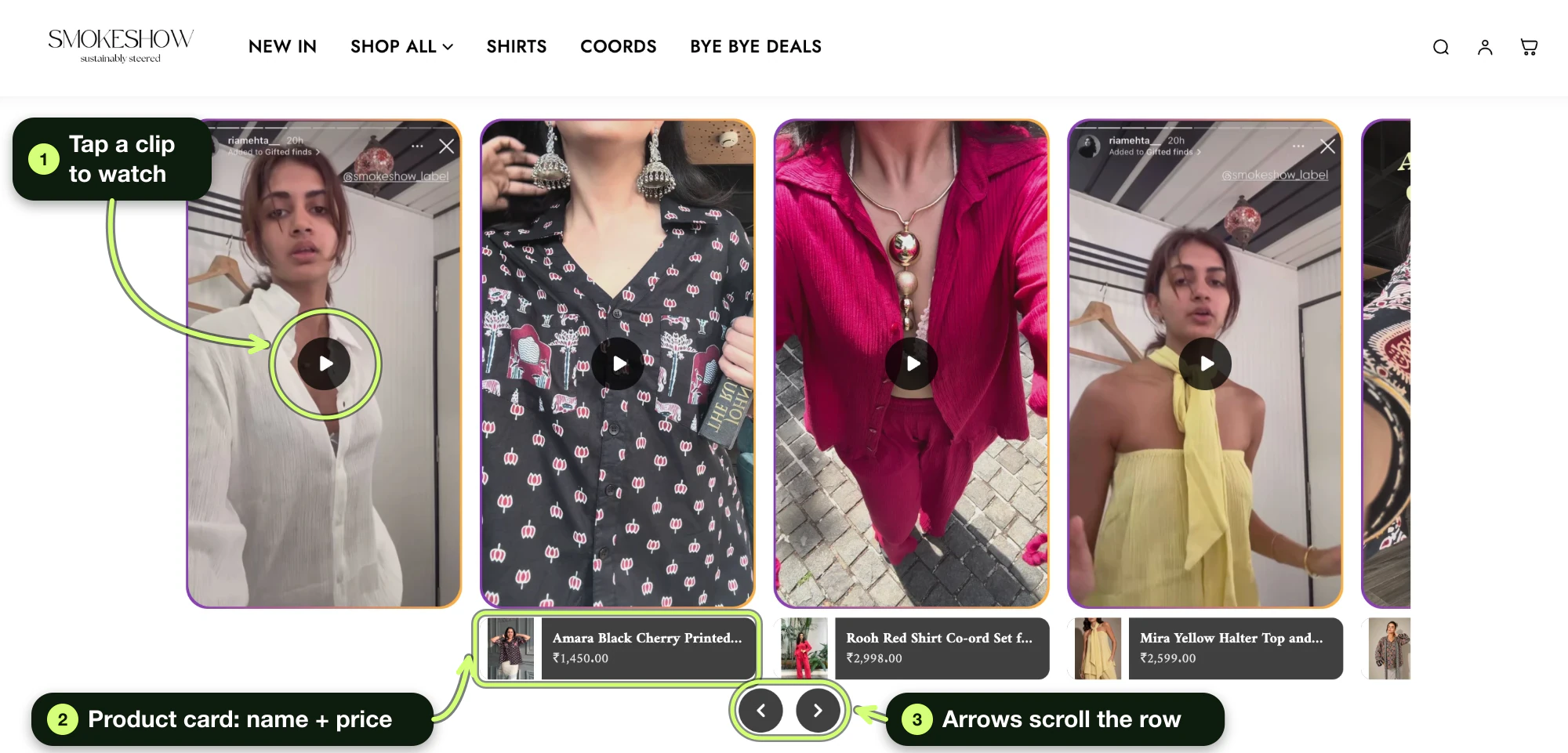
- Spell by Smokeshow (Foxr Shoppable Videos & UGC, plus an Instafeed script): A carousel of try-on videos with product cards and prices. Instafeed's loader script was on the page, but we didn't see a feed on the home page.
- Two more stores had a feed app installed. One loaded the app's script on its home page with no feed showing.
What this tells you:
- The best feeds show products up close. Pura Vida's posts show the bracelets clearly, so the tags make sense.
- Customer posts work as social proof, but you need permission and a plan for tagging them.
- Check for leftover scripts. An app can load code on pages where no feed shows. If you stop using a feed, turn off its app embed or uninstall the app.
How much code each feed adds
Speed matters, and no one we found had measured this. So we downloaded each app's main JavaScript and CSS files from a live store and noted their compressed size.
| App | JS + CSS, compressed | Main script |
|---|---|---|
| Instafeed | About 45 KB | 32 KB |
| Foursixty | About 43 KB | 32 KB |
| Foxr Shoppable Videos & UGC | About 21 KB | 16 KB |
Read this with care:
- Stores measured: Zoo Snoods (Instafeed), Pura Vida (Foursixty), and Spell by Smokeshow (Foxr Shoppable Videos & UGC).
- We left out Square. On the one store we found using it, its embed loads a 151 KB file from Vitals' servers (checked on October 11, 2026), and we couldn't tell how much of that the feed needs.
- It's one store per app, on one day. Versions and settings change the numbers.
- It leaves out the photos and videos, which usually weigh far more than the code. More posts means more weight.
- Foxr Shoppable Videos & UGC is our app, and it's a video app. We included it so you can compare.
- This isn't a full speed test. Test your own page with PageSpeed Insights before and after.
Google's targets for a good page are an LCP of 2.5 seconds or less, an INP of 200 ms or less, and a CLS of 0.1 or less. To stay close to them, show fewer posts, keep the feed below your main product image, and remove apps you don't use.
Prefer video? Turn your best Reels into shoppable videos
If your best Instagram content is Reels, a photo grid may undersell it. You can copy your best Reels onto your store as shoppable videos instead.
This is what Foxr Shoppable Videos & UGC does, so weigh our view with that in mind. It isn't a live feed. It never connects to your Instagram account, so new posts don't appear on their own. From the app's docs:
- Import. In Foxr, go to "Video library" → "Add media" → "Instagram". Tick "I confirm that I have obtained the necessary permissions, copyrights, and authorizations." Paste up to 5 links to public Reels or video posts, click "Find media", then click "Add to library" under the cards. Keep the tab open until each card shows a result.
- Tag. Open each clip. Under "Call to action", set "Link type" to "Product", click "Add product", pick the product, and click "Save".
- Build a widget. Go to "Widgets" → "Add widget". Type a "Widget name" (only you see it). Pick a "Layout" ("Stories", "Carousel", "Grid", "Pop up" or "Product page"). Click "Choose clips", pick up to 24, click "Done", then click "Save".
- Add it to your theme. Click "Add to theme". In the theme editor, click the new "UGC widget" block, click "Select" under "Widget", pick your widget, and click "Save". Then click the "App embeds" icon, switch on "FOXR - Shoppable Video", and click "Save".
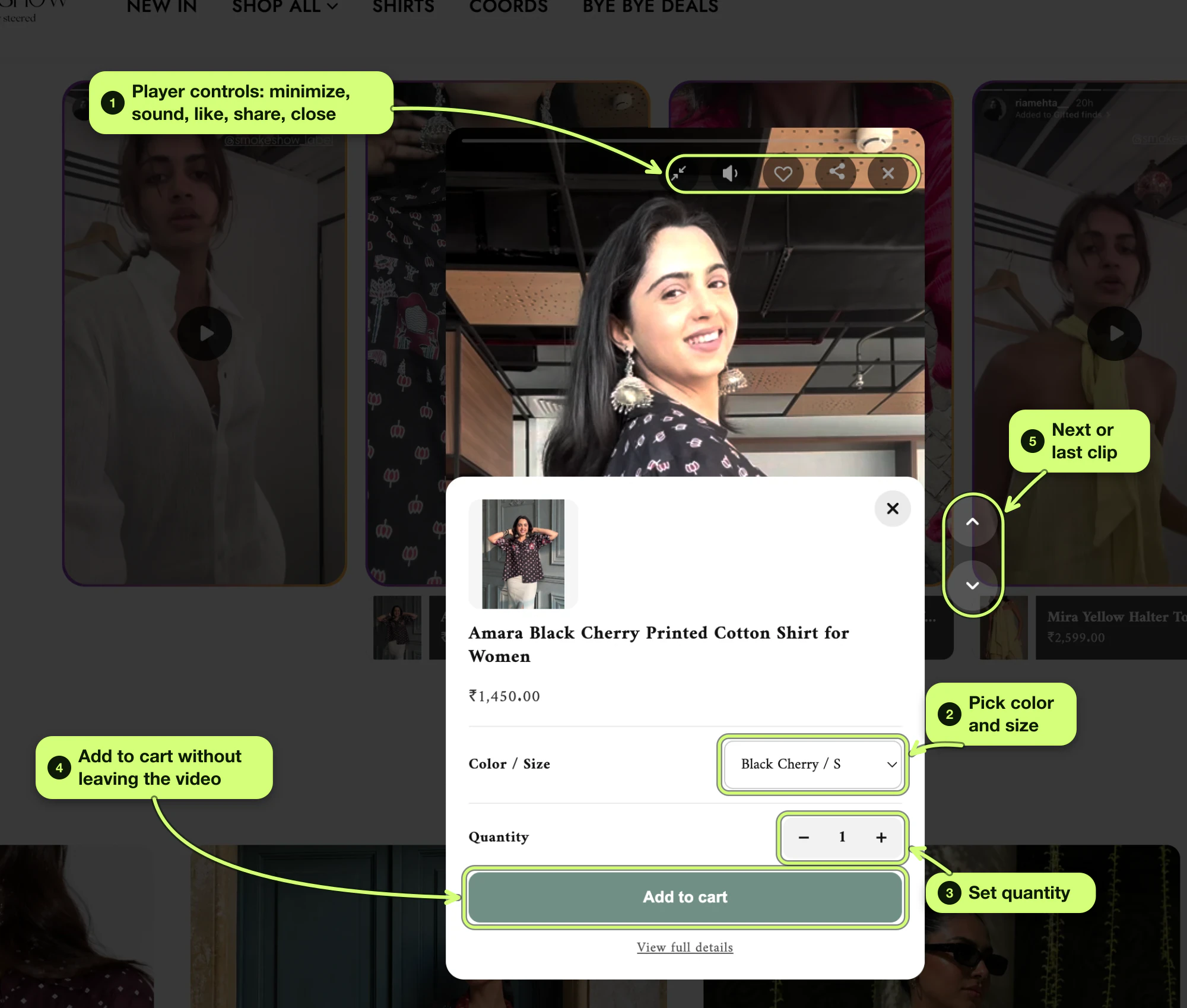
By default, tapping the product card in the player opens a quick add panel. Shoppers pick a variant, like size, and add to cart from inside the video.
After the add, shoppers go to your cart page by default. To keep the video playing, set "Add to cart action" to "Quick add" in Settings → Products. Your theme's cart drawer won't open, and the cart count updates on the next page.
Credit. The app doesn't keep the creator's @username or post link.
- The imported caption only goes to search engines. Shoppers see the video file's alt text, so add the @handle there (Content → Files).
- Turn on "Show captions" on the widget's "Player" tab, then save the widget again.
- On Stories and Pop up widgets, the caption shows only in the player.
Its limits:
- No auto-sync.
- Imports are videos only. No image-only posts, stories, or private accounts. You can upload your own images.
- 5 links at a time, up to 250 MB per video.
- One product per clip, 24 clips per widget.
- It's new. It launched September 25, 2026, and has 7 App Store reviews, all 5 stars (checked on October 11, 2026). It lists English only.
Our setup guide walks through every step with the exact button names.
Want sales inside Instagram? Use shopping tags
Shopping tags work on Instagram itself. They're free through Shopify's Facebook & Instagram app, if your store is eligible.
What Shopify and Instagram say you need:
- A published Facebook Page, a business portfolio, and an Instagram professional account linked to the Page
- Products for sale on your own verified domain, and a business located in a country Meta supports
- Products that pass Meta's review
What to know:
- You can tag up to 20 products in a photo post, or 20 in total across a carousel.
- Shopify says you can tag image stories, not video stories.
- For Reels, Instagram's creators blog (March 24, 2026) says creators can add up to 30 products from a brand's catalog on Meta. It started in the US, Brazil, India, Indonesia, and Thailand. Check what your account can do before you plan around it.
- Shoppers tap "Checkout on seller's website" and pay on your Shopify checkout. Since August 26, 2025, you handle sales tax on those orders.
- The app has 3.8 stars from 5,757 reviews, and 23% of ratings are one star.
Tags and a store feed work well together, because they sell in different places.
Pick posts that sell: the 5-question test
Ask these about each post before it goes in your feed:
- Can I see the product right away? In a photo, it should fill much of the frame. In a Reel, it should show in the first 3 seconds.
- Does it answer a doubt? Fit, size, and "how does it work?" are the big ones. Our 12 video ideas match doubts to formats.
- Is the tagged product in stock, and the right one?
- Is it still true? Check the price, color, and any offer.
- Do I have the right to show it?
Made-up example: A candle shop has 40 recent posts. 6 show a hand holding a candle. 10 are gift ideas. 12 are quotes. 12 are event photos. It picks the 12 clearest of the 16 product posts, tags each one, and hides the other 28.
Where to put your feed
- Product page, near the buy button. That's where doubts happen. Some apps can show only posts tagged with that product. (In Foxr Shoppable Videos & UGC, that's the "Product page" layout. Its "Which clips" setting defaults to "Only clips tagged with this product".)
- Every product page at once. Add the block to your default product template. It then shows on every product that uses that template. Products on other templates need their own block.
- Home page, below the hero. Good for a trust row. A heading like "Real customers, real fits" says more than "Our Instagram."
- A "Shop the look" page. A full grid works here. Link to it from your menu.
- Not at the very bottom. Foxr Shoppable Videos & UGC's analytics docs say a low play rate is normal for widgets near the bottom of a page.
Rules for other people's posts
- Ask in writing. A short DM works: "We love your post! Can we show it on our website?"
- Import only after they say yes. Foxr Shoppable Videos & UGC asks you to confirm you have the rights before it imports. To pause a clip later, set its "Status" to "Draft". It stays in your library but leaves your widgets within a minute or two. If that leaves a widget with fewer clips than its "Show only with at least" number, or "Minimum media to display feed" in Settings → Feeds (whichever is higher), the whole widget hides.
- Say what they got. The FTC says free or discounted products count as a "material connection." Disclose it.
- Don't buy praise. An FTC rule banning fake and misleading reviews took effect on October 21, 2024. See its Q&A.
- Credit them. Keep their @handle visible. In Foxr Shoppable Videos & UGC, put it in the file's alt text, turn on "Show captions", and save the widget again (see above).
For a copy-paste permission message and the FTC rules on rewards, see Step 3 of our UGC guide.
This is not legal advice. See the FTC's disclosure guide.
Measure it: a 4-step test
- Get a baseline. Two weeks of add-to-cart and conversion rate on the page you'll change.
- Change one thing. Add the feed to one page only.
- Wait 2 to 4 weeks. Don't judge in the first few days.
- Compare with your baseline. Use the same number of weeks before and after. Then check the app's own numbers. For a fair test, see Step 7 of our video conversion guide.
What the listings say each app tracks: Instafeed Plus lists performance analytics. Foursixty Essential lists gallery metrics.
Foxr Shoppable Videos & UGC shows numbers per clip. In "Widgets", click a widget's chart button ("View analytics") and scroll to "Clips". You'll see Revenue, Views, Plays, Product clicks, Added to cart, and Orders. The range defaults to "Last 30 days".
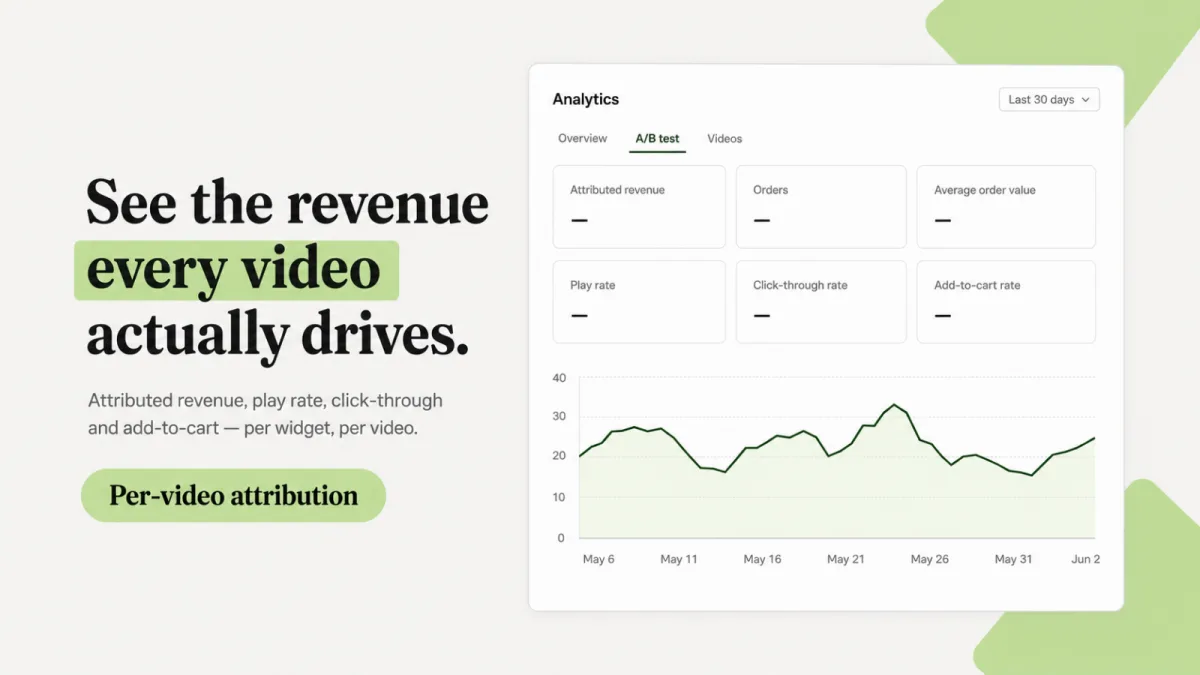
Read app numbers with care. Foxr Shoppable Videos & UGC, for example, credits a clip when a shopper buys within 30 days from the same cart. It doesn't credit:
- Shoppers who decline tracking
- Express checkout from the product page
- A purchase on another device
- A variant swap in the cart
Refunds aren't subtracted, and your own visits count. Other apps have their own rules, so read their docs.
More on why the number is never exact: How sales get credited.
Instagram feed not working on Shopify? 8 fixes
| What you see | Try this |
|---|---|
| Feed stopped updating | Reconnect Instagram in the app |
| Account won't connect | Switch to a Business or Creator account |
| New posts are missing | Check auto publish and the post limit |
| Feed gone after a theme change | Turn the app back on and re-add its block |
| App missing under Add block | Use Add section, then pick it under Apps |
| Tag shows the wrong price | Fix the price in Shopify |
| No Embed option on a post | The account is private, or embeds are off |
| Page got slower | Show fewer posts, or move the feed lower |
How we made this guide
- The search results. On October 11, 2026, we reviewed the top Google results (US) and Bing results for "shoppable instagram feed" and "how to add shoppable instagram feed to shopify." Most were app listings or vendor guides that promote one tool.
- AI answers. We asked Gemini the same question. It named apps we then checked, and some of its prices and developer names didn't match the listings. Every price here comes from the listing itself.
- The apps. On October 11, 2026, we read 10 App Store listings (8 feed apps, Facebook & Instagram, and our own) and the Vitals help page. We didn't install the 8 feed apps.
- The stores. We visited 5 live stores, noted what we could see, and downloaded each feed app's main files to measure their size. On Spell by Smokeshow, Foxr Shoppable Videos & UGC's files came to 16.2 KB (widget.js) plus 4.8 KB (widget.css), Brotli-compressed.
- Shopify facts come from the Help Center on app blocks and app embeds, the Facebook & Instagram channel requirements, and Instagram Shopping. We checked the section lists of Dawn and Horizon on GitHub on October 11, 2026. Horizon only has social link icons.
- Instagram and Meta facts come from Instagram's Help Center on shopping tags and embeds, Instagram's creators blog on Reels, and Meta's Basic Display API notice.
- Speed targets come from web.dev. Review rules come from the FTC. Foxr Shoppable Videos & UGC facts come from its docs, checked on October 11, 2026.
- We make Foxr Shoppable Videos & UGC. It isn't a feed app, and we said so.
FAQ
What is a shoppable Instagram feed?
It's a gallery of your Instagram posts on your website, where each post is linked to products. Shoppers tap a post, see the tagged items, and buy them.
How do I add a shoppable Instagram feed to Shopify?
Install a feed app, connect your Instagram Business or Creator account, tag products on your posts, and add the app's block in the theme editor. Then test it on your phone.
Can I add an Instagram feed to Shopify for free?
Yes. Square: Instagram Feed Gallery and MP Instagram Feed both list free product tagging. Instafeed, Showcase, and Socialwidget have free feeds, but tags cost extra.
Can I add an Instagram feed to Shopify without an app?
Not a shoppable one. You can paste Instagram's embed code for a public post into a Custom Liquid section. Some accounts can also embed a profile preview of recent posts. Shoppers can't buy from either.
Do I need an Instagram Business account?
For most apps, yes, or a Creator account. Socialwidget's listing says its free plan also works with personal accounts.
Can my feed pull in customer posts automatically?
Some plans can. Showcase Starter ($5.99) lists hashtag search, Instafeed Plus ($20) lists posts you're tagged in, Covet Growth ($29.99) syncs mentions and 2 hashtags, and Showcase Pro ($39) lists @mentions and tags. You still need each customer's permission to show their post.
What's the best shoppable Instagram feed app for Shopify?
It depends on your budget. Square and MP Instagram Feed are free with tags. Instafeed has the most reviews among feed-only apps, with tags from $8 a month. Foursixty is a bigger tool, from $90 a month.
Why did my Instagram feed stop working on Shopify?
Often the connection dropped. Reconnect Instagram in the app. If you changed themes, turn the app back on in the new theme and re-add the feed block.
Will an Instagram feed slow down my store?
It can. The two feed apps we measured added about 43 to 45 KB of code, before any photos. Show fewer posts, keep the feed lower on the page, and test with PageSpeed Insights.
Does Foxr Shoppable Videos & UGC sync my Instagram feed?
No. Foxr Shoppable Videos & UGC is a shoppable video app. In "Video library" → "Add media" → "Instagram", you paste up to 5 links to public Reels or video posts, and it saves a copy of each to your Shopify Files. It never connects to your Instagram account, so new posts don't appear on their own.
Next step: test one feed on one page
Pick an app from the table, add 8 to 12 product posts, and put the feed on one busy page. Write down your numbers, wait 2 to 4 weeks, and compare.
If your best Instagram content is video, Foxr Shoppable Videos & UGC turns your Reels into shoppable stories, carousels, and grids. Shoppers pick a variant, like size, and add to cart from the video. It's free on the Shopify App Store.
New to the idea? Start with What is shoppable video? Want more UGC apps? See the best UGC platforms for Shopify.