
What Is Shoppable Video? How It Works on a Shopify Store
By Foxr Team · Foxr · Updated · 19 min read
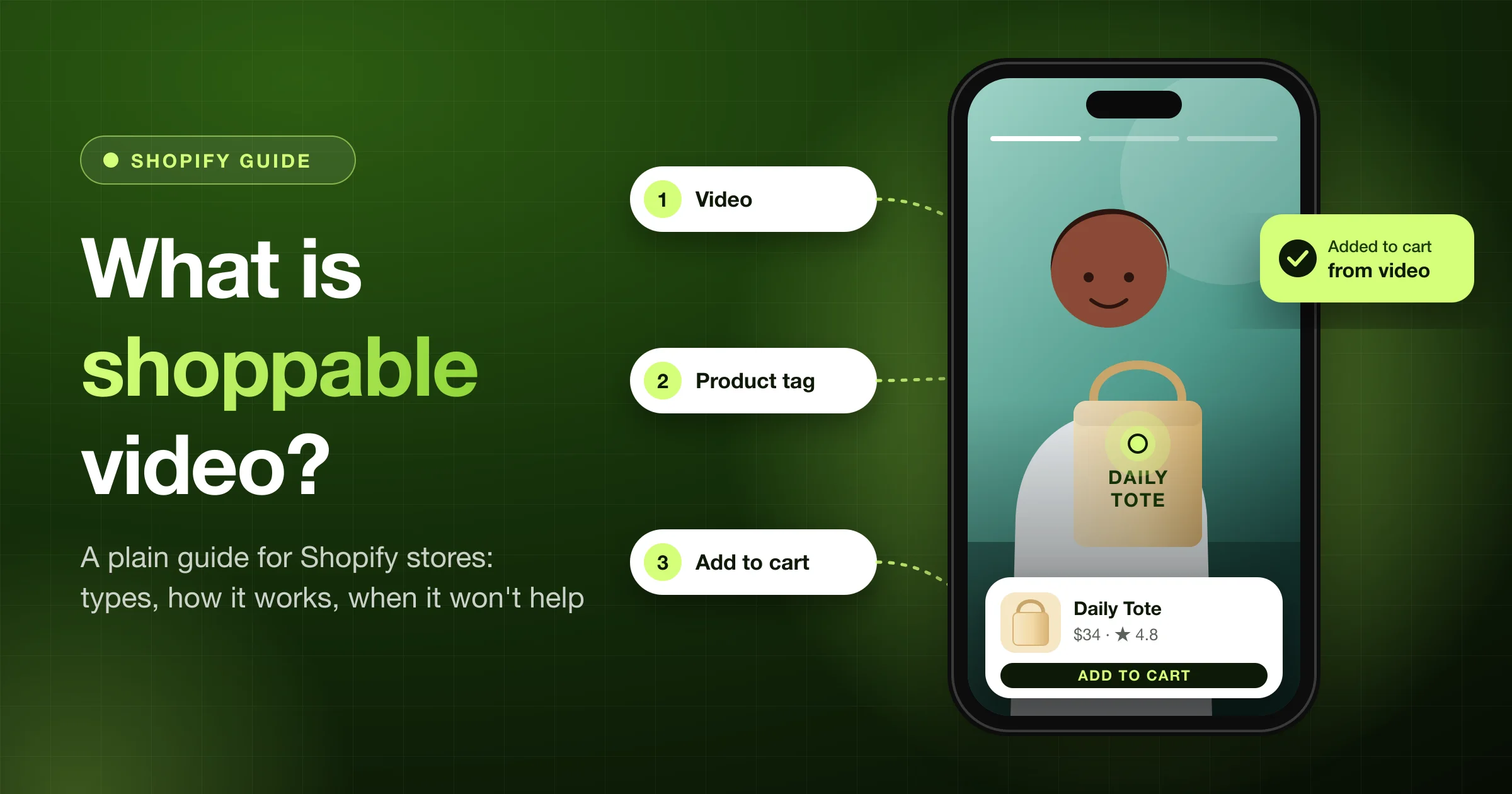
Shoppable video is a short video with a product tagged on it, so shoppers can add that product to their cart without leaving the video.
On a Shopify store, it's usually a row of clips on the home page or a product page. A shopper taps a clip, and it plays full screen on their phone. A card at the bottom shows the product's photo, name, and price. One more tap opens a panel to pick a size and add to cart.
Below: a live Shopify store example, the 5 layouts, how sales get counted, what research says, and when to skip it.
Full disclosure: We make Foxr Shoppable Videos & UGC, so the examples come from it, and we list its limits. It launched on September 25, 2026. On October 11, 2026, it had 7 reviews (5.0) and an English-only listing on the Shopify App Store, so we have no long-run results to share.
Key takeaways
- Shoppable video = a video + a product tag + a way to buy. Without the tag and the buy button, it's just a video.
- On a Shopify store it usually takes one of 5 layouts: a stories bar, a carousel, a grid, a product page strip, or a floating pop-up. Tap a clip and a player opens, like Reels or TikTok.
- It isn't the same as a product video in your photo gallery, a video review, or live shopping.
- The sales number is an estimate. Each tool decides for itself which clip gets credit.
- It won't fix a weak product, a high price, or a slow site.
- Proof is thin. Independent studies exist for product video in general. For shoppable video itself, we found only a few, mostly surveys of what shoppers say they'd do, not store sales. Test it on your own store.
Shoppable video in plain words
A shoppable video has 4 parts and a scoreboard:
- The clip. A short, usually vertical video. It can come from your brand, your customers, or social media.
- The tag. A link between the clip and one of your products. In Foxr Shoppable Videos & UGC, you open the clip in "Video library" and set "Call to action" to "Product". It shows on your store within a minute or two (full steps).
- The product card. The photo, name, and price over the bottom of the video. In Foxr Shoppable Videos & UGC, the price is the lowest across the product's variants, in the shopper's currency, next to a round "+" button. On Carousel and Grid layouts, a small product chip can also sit under or over each thumbnail.
- The buy path. What happens on tap: a quick add panel or the product page. In Foxr, you choose in Settings → Products → "Buy button action": "Open quick add panel with product details" (the default) or "Link to the product page".
- The scoreboard. Reports that follow each clip from view to order. The Analytics page in Foxr Shoppable Videos & UGC reads like a funnel: Views, Plays, Product clicks, Added to cart, Orders. The rates in between show where shoppers drop off.
Tags come in two styles. Some tools put a clickable dot (a hotspot) on the item in the video. Others, like Foxr Shoppable Videos & UGC, show one product card over the bottom of the video. We didn't test the hotspot tools.
A simple test: if a shopper can't get to your product from the video in one tap, it isn't shoppable yet.
Shoppable video vs. things it gets mixed up with
| Thing | Tag and buy button? | How it differs |
|---|---|---|
| Product video in Shopify media | Usually no | A plain video in the photo gallery |
| UGC (customer content) | Only if you add it | Means a customer made the clip |
| Video reviews | Usually no | Collected after a purchase, shown with a star rating |
| Live shopping | Yes | Happens in real time, on a schedule |
| "Interactive video" | Not always | A wider term. It can mean quizzes or branching stories |
The short version: a clip can be UGC and shoppable at the same time.
About live streams: some glossaries, like Salsify's, count live video as shoppable video too. This guide covers recorded clips on your store and treats live shopping as its own thing.
Comparing review and video apps? See our UGC app comparison. Want to collect customer clips? See how to use UGC video on Shopify.
How shoppable video works (with a real store example)
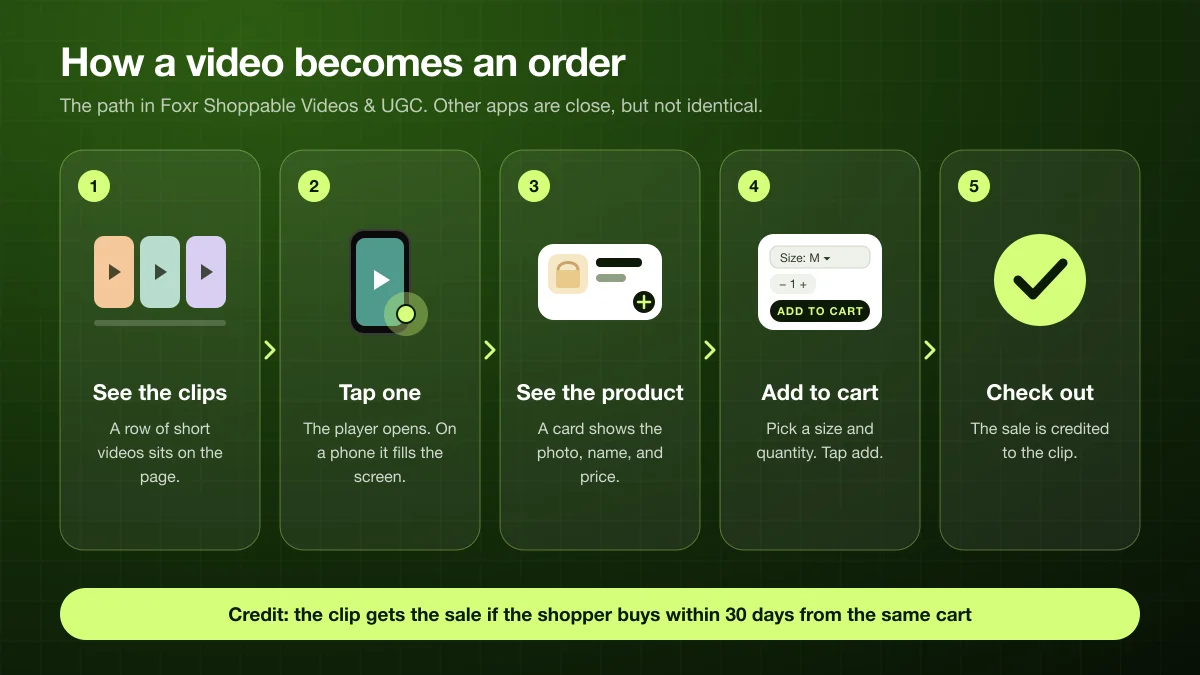
One condition the diagram leaves out: where shoppers are asked about cookies, a sale is credited only if they allow analytics tracking. More in How sales get credited.
Here is the path in Foxr Shoppable Videos & UGC. Other apps are close, but not the same.
- The shopper sees a row of clips on a page.
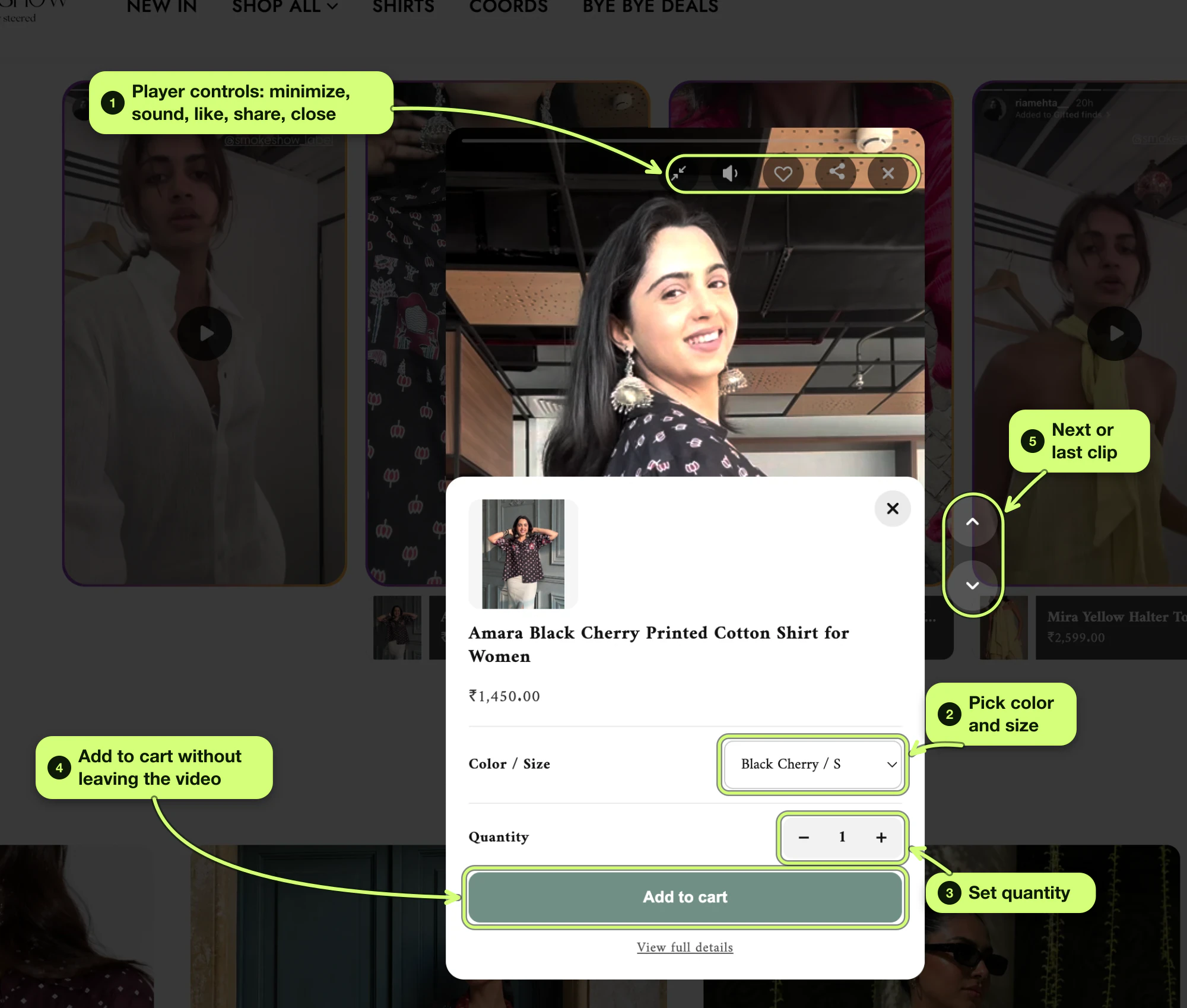
- They tap one. On a phone, the player fills the screen, and they swipe up for the next clip. On a computer, it's a tall 9:16 frame with up and down arrows.
- A product card shows at the bottom with the photo, name, lowest price, and a round "+" button. If the product has a single variant that's in stock, "+" adds it to the cart in one tap.
- They tap the card. A quick add panel slides up. Shoppers pick a variant from one dropdown (the first one in stock is already picked) and set "Quantity" (1 to 99). Then they tap "Add to cart", or "View full details" to open the product page.
- Then your setting decides. In Settings → Products → "Add to cart action", "Go to cart" (the default) opens the cart page. "Quick add" shows a short "added to cart" message and keeps the video playing.
Either way, shoppers pay in Shopify's normal checkout.
About sound: videos start with sound, unless "Open muted" (Settings → Fullscreen player) or "Start with sound off" (the widget's "Player" tab) is on. Some browsers, mostly on iPhones, block sound until the shopper taps.
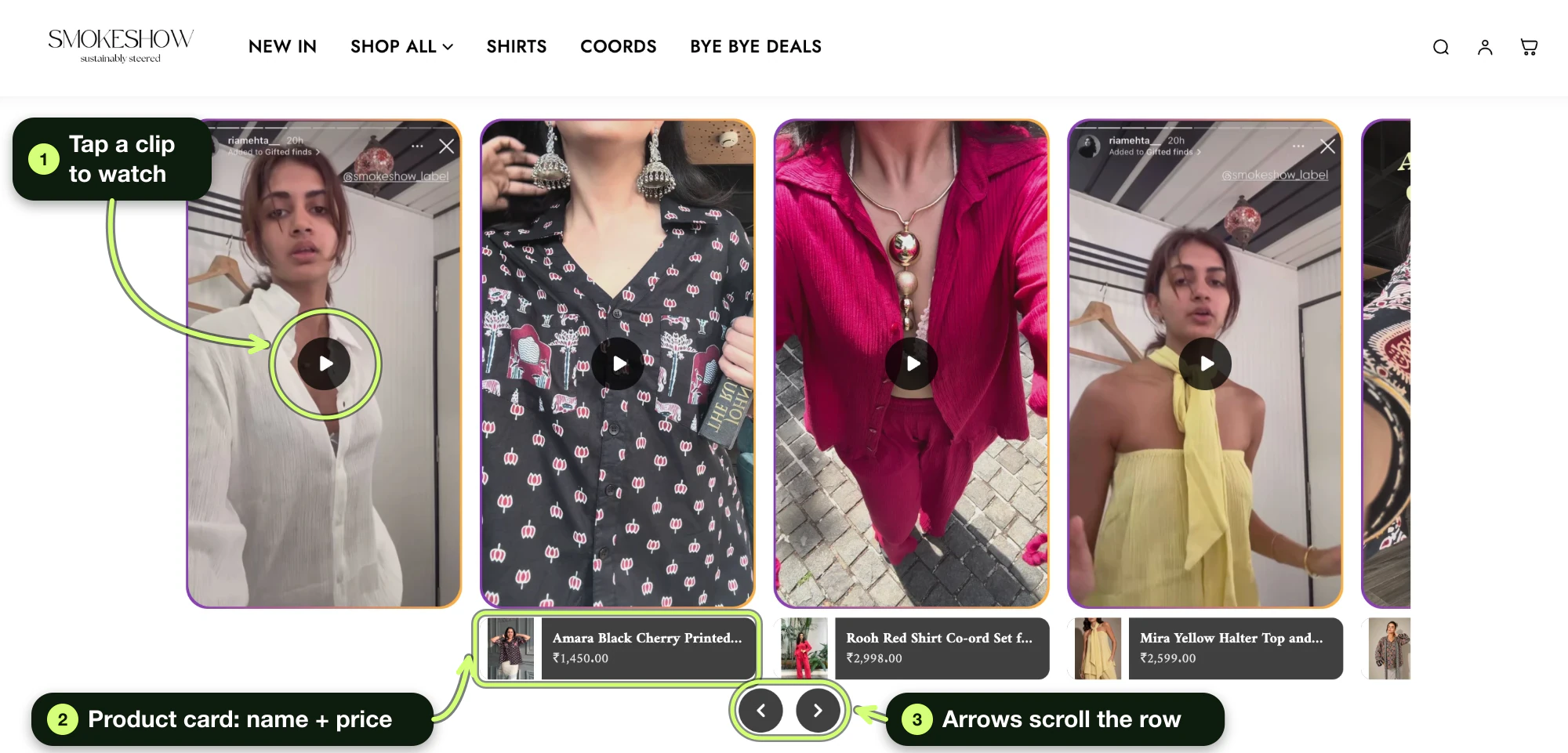
Here's what that looks like on a live store. These screenshots are from Spell by Smokeshow, an Indian clothing brand on Shopify that uses Foxr Shoppable Videos & UGC. We visited on October 5, 2026, and checked on October 11, 2026, that the carousel was still live.
It shows a product card under each tagged clip and round arrows under the row. Those are the Carousel defaults in Foxr Shoppable Videos & UGC ("Product card": "Under the clip", and "Arrow position": "Under the row").
The 5 types of shoppable video on a Shopify store
We group them by where they sit, because that decides what they're good for.
| Type | What shoppers see | Best spot |
|---|---|---|
| Stories bar | Round thumbnails with a colored ring, like social stories | Top of home or collection page |
| Carousel | Video cards that scroll sideways | Home page, "Shop the look" |
| Grid | Tiles in rows, like a wall of clips | A UGC page or lookbook |
| Product page strip | A swipeable strip of clips for that product | Under the buy button |
| Pop-up | A small video bubble in a corner | Any page, as a nudge |
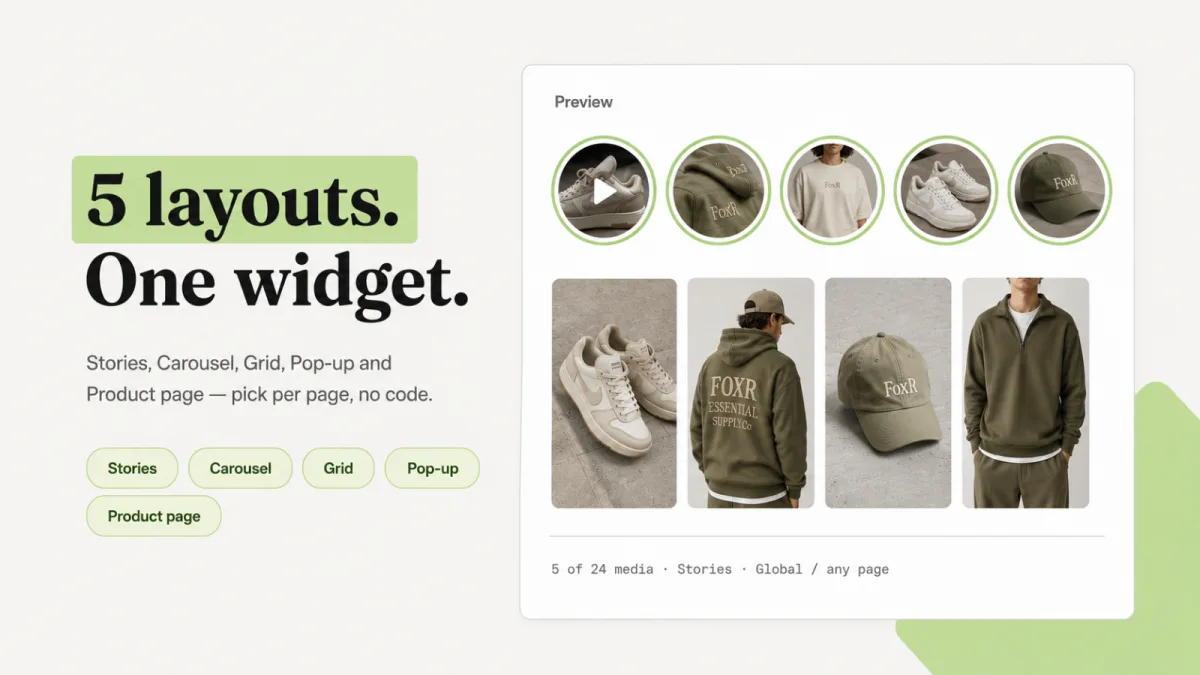
In Foxr Shoppable Videos & UGC, you pick one in the widget editor under Media → Basics → "Layout": "Stories" (the default), "Carousel", "Grid", "Pop up", or "Product page". Each widget plays up to 24 clips.
Tapping a clip opens the player. To change that, set "Open in" on the widget's "Player" tab to "Floating mini player", or, on Carousel and Grid, "Play inside the card".
Looking for what to film, like try-ons, how-tos, or reviews? See 12 shoppable video ideas.
How to pick:
- Want trust on the first scroll? Use a carousel or stories bar on the home page.
- Want fewer doubts at the buy button? Use a product page strip. In Foxr Shoppable Videos & UGC, one "Product page" widget can serve every product page (add its block to each product template you use), with up to 24 clips across all products. Each page shows only the clips tagged with that product, or every clip if none match ("Show every clip when none match" is on by default).
- Have lots of customer clips? Use a grid. The grid in Foxr Shoppable Videos & UGC shows all its clips at once, up to 24, with no "load more".
- Want a nudge on every page? Try a pop-up. In Foxr Shoppable Videos & UGC, it appears 5 seconds after the page loads ("Wait" goes from 0 to 60) and plays without sound. By default, once a shopper closes it, it stays closed in that browser tab. See where to put it.
Shoppable video off your store
Social platforms have their own product tags. They're a different channel from the videos on your store.
| Where | How products get tagged | Catch |
|---|---|---|
| YouTube | Shopping button, or a sticker on Shorts | Needs the YouTube Partner Program |
| Shopping tags on posts and Reels | Needs a Meta catalog | |
| TikTok | A product link on the video | Needs TikTok Shop |
| Shop app | Home feed, and a product page block | Shows only on Shop |
The details, checked on October 11, 2026:
- YouTube allows up to 60 products per video, and your channel must meet a subscriber threshold (YouTube Help, eligibility rules).
- Instagram said in March 2026 that Reels can tag up to 30 products from a brand's Meta catalog. It's rolling out by country, starting with the US, Brazil, India, Indonesia, and Thailand (Instagram's creators blog; how it works for stores).
Shop app, dated facts: On October 15, 2025, Shopify removed shoppable videos and posts from Shop product pages and Shop Stores. It kept videos in the Shop home feed and ended shoppable posts.
On March 25, 2026, it added a Shoppable Video block to the Shop Editor for Shop product pages. It shows in the Shop app and on shop.app. Shop changes often, so check Shopify's changelog.
Ads are a separate thing. Ad platforms also sell shoppable video ads, even on streaming TV. Amazon, for example, announced shoppable ads for Prime Video in May 2024. Those are paid media, and this guide doesn't cover them.
This guide is about the videos on your own store. That's where shoppers are already deciding, and where checkout stays on Shopify.
Benefits of shoppable video
None of these is guaranteed.
- Fewer steps to buy. Shoppers add to cart from the clip instead of hunting for the product.
- Answers doubts in seconds. A clip shows size, feel, and use better than a photo.
- Builds trust. Real customers on camera can feel more honest than studio shots.
- Shows what sells. Per-clip numbers tell you which videos lead to orders. In Foxr Shoppable Videos & UGC, a widget's "View analytics" page ranks its clips by revenue, with views, plays, product clicks, adds to cart, and orders.
- Reuses content you already have. Reels, TikToks, and customer clips (with permission) get a second job on your store. Foxr Shoppable Videos & UGC can import public Instagram and TikTok videos (how).
The trade-offs: it takes time to film and tag clips, and video can slow a page if it loads too early.
Does shoppable video work?
What we can back up:
- Video on product pages can lift sales. In a randomized field experiment, a midsized US fashion retailer added videos to 66 of its 319 main clothing items. Sales rose 14.5% for those items and 28.3% for the matching accessories (Kumar and Tan, Management Science, 2015).
- Speed matters. In Deloitte's Milliseconds Make Millions study of 37 brands, a 0.1 second faster mobile site went with 8.4% more retail conversions. Google paid for the study, and it shows a link, not proof. Still, it's a reason not to let video slow your page.
What the 2015 study is not: the video wasn't shoppable. A model walked around to show the outfit and its matching pieces. It was one retailer, in spring 2012, selling items that averaged about $20.
What we left out: the big numbers you see on vendor blogs, like "3x" or "300% more sales." Most trace back to other vendor blogs, not to a study we could check.
Video helps when it answers a real doubt. Letting shoppers buy from it removes steps. How much it helps your store is something only a test can tell you.
When shoppable video does not help
Skip it, or wait, if any of these is true:
- You have very little traffic. The A/B test in Foxr Shoppable Videos & UGC needs at least 500 views per version, and a gap in orders per view that passes a 95% confidence check. Made-up example: at 60 views a day split 50/50, each version needs about 17 days just to reach 500 views. A winner can take much longer.
- Your page is already slow. Fix speed first. A video on a slow page can hurt.
- You have no real footage. Stiff, stock-style clips feel fake. Phone clips and customer clips usually feel more honest.
- Photos already answer every question. Plain, cheap, well-known items rarely need a demo. This is our opinion, not a measured rule.
- You can't get permission for customer clips. Without it, don't use them.
Selling subscriptions, engraved items, or relying on a cart drawer? See the limits of Foxr Shoppable Videos & UGC below.
How sales get credited (and why the number is never exact)
Most tools note which clip a shopper used, then credit the sale later. Here's how Foxr Shoppable Videos & UGC does it:
- The shopper uses a clip. They add a product from it, or go from it to the product page.
- The app leaves a hidden note on the cart. It records the widget, clip, product, and time, and keeps the last 8 actions.
- The shopper checks out. On the order confirmation page, the "FOXR attribution pixel" reads the note.
- The clip gets credit if the order came within 30 days, from the same cart.
Why the number is off:
- Only that product counts, at the price paid after item discounts, without shipping. Order-wide discounts aren't subtracted, and if your prices include tax, so does the amount.
- A product page visit credits one unit, even if the shopper buys three. Units added from the video all count.
- Declined tracking means no credit. If a shopper declines analytics tracking, their purchase isn't credited, but their views and clicks still count. In regions where shoppers are asked about cookies, the conversion rate reads lower than it really is.
- Some paths miss the note: an express checkout button on the product page, a variant switched in the cart, or another device.
- Nothing is filtered out. Refunds aren't subtracted, test orders and your own visits can count, and days run on UTC.
- It lives in the app. These numbers don't show up in Shopify's own Analytics.
Treat it as a rough guide. To read the dashboard, see Read your results. For the real answer, compare your product page conversion rate before and after, as our conversion rate guide shows.
Will shoppable video help my SEO?
A little, but don't count on it.
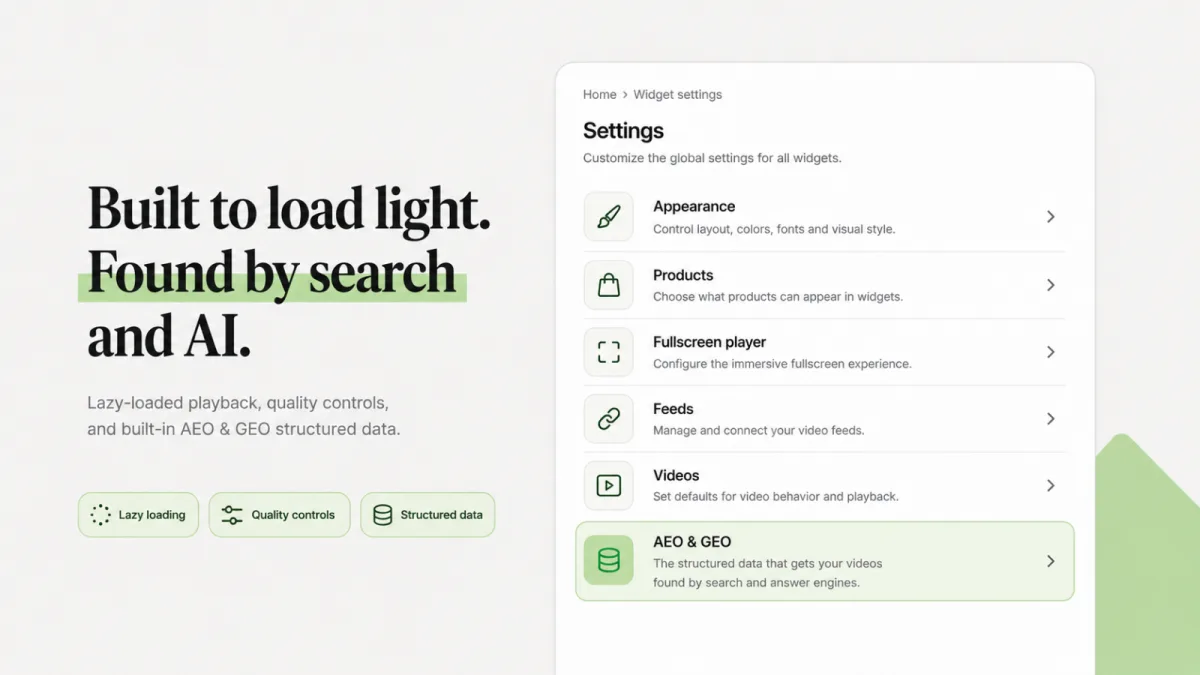
- Apps can add video structured data (VideoObject). In Foxr Shoppable Videos & UGC, "Add video structured data" (Settings → "AEO & GEO") is on by default, and your clip names become the video titles (tips). Google requires a name, a thumbnail URL, and an upload date (Google's video structured data docs).
- But Google says a product page with a video isn't a "watch page," because the video is extra to the rest of the page. Video results are meant for pages where the video is the main thing (Google's video SEO guide).
- So the page can still show as a normal result, or in Google Images with a video badge. Don't expect it in video results. A home page row of clips isn't a watch page either, because Google says a page that lists several videos of equal weight doesn't count.
Subtitles help shoppers follow along with the sound off. Foxr Shoppable Videos & UGC shows a "CC" button for clips with a subtitle file, but it doesn't write subtitles for you (how to add them). With "Include the transcript in structured data" on (the default), the start of the subtitle text goes into the structured data too.
Rules to follow
- Get permission for customer clips. Save the "yes" in writing. Before Foxr Shoppable Videos & UGC imports from Instagram or TikTok, you must tick "I confirm that I have obtained the necessary permissions, copyrights, and authorizations." The app doesn't keep the creator's handle or the post link, so save those yourself. See how to ask for permission.
- Disclose paid or gifted content. The FTC says to put the disclosure in the video itself, not just in the description. Viewers are more likely to notice it if you say it and show it on screen.
- Respect tracking choices. Don't try to get around a shopper's "no." The FOXR attribution pixel only runs for shoppers who allow analytics tracking.
- Keep it fast. Video slows a page when it loads too early. Foxr Shoppable Videos & UGC loads thumbnails only as they scroll into view, and moving thumbnail previews ("Preview videos") are off by default on Stories, Carousel, and Grid.
- Test your speed anyway. In the player, Settings → Videos → "Playback mode" starts on "Performance", which plays a smaller version (up to 720p) so videos start sooner. Check your page speed before and after.
Limits of Foxr Shoppable Videos & UGC
It's a new app, and it doesn't do everything. Check these before you install:
- One product per clip. The app shows only the first tagged product, and only if it's Active in Shopify. If a clip shows three items, tag the main one.
- Tag products you sell online. A product that isn't on your Online Store sales channel, or isn't sold in the shopper's market, can still show a card. But the quick add panel can't load it, and a tap may end on a "page not found".
- No Buy now button. Shoppers add to cart, then check out as usual.
- No crossed-out prices. Cards show the current price, but not the compare-at price, so shoppers don't see a "was" price.
- No subscriptions or custom fields. The panel only sends the variant and quantity. Selling plans, engraving text, or an uploaded file need the product page, which shoppers reach with "View full details".
- The cart drawer doesn't open. The header cart count doesn't update either, which is why "Go to cart" is the default. With "Quick add", the count catches up on the next page the shopper opens.
- Only "Product" shows to shoppers. You can save a "Collection" or "Custom link" call to action on a clip, but shoppers don't see it.
Other tools may let you tag more than one product per clip. Check this before you pick an app.
Start in 4 steps
- Pick one best seller. That's where the traffic is.
- Make 3 short clips. Need ideas? See 12 shoppable video ideas.
- Add them, tag the product, and place them on that product page. Our setup guide walks through every screen in Foxr Shoppable Videos & UGC: "Video library", a "Product page" widget, the "FOXR - Shoppable Video" app embed, and the "UGC widget" block.
- Compare 2 to 4 weeks before and after. Start the "before" after September 23, 2026, when Shopify changed how it counts sessions. Use Shopify's own Analytics for the "before", since the Analytics page in Foxr Shoppable Videos & UGC only counts once the widget is live. Then use the app's page to see which clips sell (how to test fairly).
How we made this guide
- On October 11, 2026, we re-checked the App Store listing (Free, 5.0 from 7 reviews, English), the Spell by Smokeshow carousel (still live), and every page of the Foxr Shoppable Videos & UGC docs we quote.
- The same day, we re-checked our outside sources: the Kumar and Tan paper, Deloitte's report, Google's video docs, the FTC page, YouTube Help, Instagram's creators blog, the Shopify changelog, and Amazon's ad announcement.
- We first wrote this guide on October 5, 2026, from the Shopify Help Center, Google Search Central, YouTube and Meta help pages, and the FTC's guidance.
- We read the top-ranking explainers to see what they cover, then wrote about what they skip, like limits, how credit works, and when to skip shoppable video.
- We left out stats we couldn't trace to a real study.
- The layout and settings images come from Foxr Shoppable Videos & UGC. The store screenshots come from a live store we visited.
- We didn't test other apps hands-on.
FAQ
What is shoppable video?
Shoppable video is a video with a product tagged on it. Shoppers can see the price and add the product to their cart right from the video, without searching your store.
What is an example of a shoppable video?
Spell by Smokeshow, a Shopify clothing store, has a row of try-on clips on its home page, made with Foxr Shoppable Videos & UGC. It was still live on October 11, 2026. Shoppers tap a clip, see the product card, and add to cart from a panel. For more, see these real shoppable video examples.
How does shoppable video work on Shopify?
You add clips to a shoppable video app, tag one of your products on each, and place the app's block on a page. Shoppers tap a clip, see the product card, and add to cart. To set it up in Foxr Shoppable Videos & UGC, follow our step-by-step guide.
Do I need an app for shoppable video on Shopify?
For your online store, yes. Shopify can show a plain product video in your media gallery, but there's no product tag or add to cart inside it. Shopify's Shop app has its own Shoppable Video block, but it only shows on Shop (the app and shop.app), not on your store. See Can Shopify do shoppable video without an app?
What is the difference between shoppable video and product video?
A product video is a plain video, often in your photo gallery. A shoppable video has a product tag and a way to buy it, so shoppers can act while they watch.
Is shoppable video the same as UGC?
No. UGC means content made by customers. A UGC clip can be shoppable if you tag a product on it. A brand-made clip can be shoppable too.
Does shoppable video increase sales?
It can, when the clip answers a real doubt and the page stays fast. Studies show product video can lift sales. Proof for shoppable video itself is thin, so run your own before-and-after test.
How much does shoppable video cost on Shopify?
Some apps are free, and some charge by plan or by viewers. On October 11, 2026, Foxr Shoppable Videos & UGC was free. For other apps, see our price comparison, checked the same day.
Can shoppers check out inside the video?
In Foxr Shoppable Videos & UGC, no. Shoppers add to cart from the video, then use Shopify's normal checkout. Other tools may work differently.
Next step: try it on one product
Pick your best seller, film one short clip, and tag the product.
Foxr Shoppable Videos & UGC turns your clips into shoppable stories, carousels, grids, pop-ups, and product page strips. Shoppers pick a size and add to cart without leaving the video.
It's free on the Shopify App Store. On Online Store 2.0 themes, there's no theme code to touch. Older themes need a short pasted snippet.
Once more shoppers are buying, grow each order too. Foxr ‑ Bundle Builder lets shoppers build their own mix-and-match box with tiered discounts.